
Hadoop_23_MapReduce倒排索引实现
1.1.倒排索引
根据属性的值来查找记录。这种索引表中的每一项都包括一个属性值和具有该属性值的各记录的地址。由于不是由记录来确
定属性值,而是由属性值来确定记录的位置,因而称为倒排索引(invertedindex)
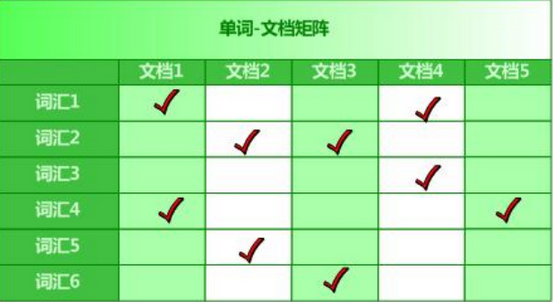
例如:单词——文档矩阵(将属性值放在前面作为索引)
1.2.MapReduce实现倒排索引
需求:对大量的文本(文档、网页),需要建立搜索索引
代码实现:
package cn.bigdata.hdfs.mr;

import java.io.IOException;

import org.apache.hadoop.conf.Configuration;

import org.apache.hadoop.fs.Path;

import org.apache.hadoop.io.IntWritable;

import org.apache.hadoop.io.LongWritable;

import org.apache.hadoop.io.Text;

import org.apache.hadoop.mapreduce.Job;

import org.apache.hadoop.mapreduce.Mapper;

import org.apache.hadoop.mapreduce.Reducer;

import org.apache.hadoop.mapreduce.lib.input.FileInputFormat;

import org.apache.hadoop.mapreduce.lib.input.FileSplit;

import org.apache.hadoop.mapreduce.lib.output.FileOutputFormat;

/**

 * 使用MapRedeuce程序建立倒排索引文件

 * 文件列表如下:

 *  a.txt               b.txt                  c.txt

 *  hello tom           hello jerry            hello jerry

 *  hello jerry         hello jerry            hello tom

 *  hello tom           tom jerry

 */

public class InverIndexStepOne {

    static class InverIndexStepOneMapper extends Mapper<LongWritable, Text, Text, IntWritable>{

        Text k = new Text();

        IntWritable v = new IntWritable(1);

        @Override

        protected void map(LongWritable key, Text value, Context context) throws IOException, InterruptedException {

            String line = value.toString();

            //将得到的每行文本数据根据空格" "进行切分

            String [] words = line.split(" ");

            //根据切片信息获取文件名

            FileSplit inputSplit = (FileSplit)context.getInputSplit();

            String fileName = inputSplit.getPath().getName();

            for(String word : words){

                k.set(word + "--" + fileName);

                context.write(k, v);

            }

        }

    }

    static class InverIndexStepOneReducer extends Reducer<Text, IntWritable, Text, IntWritable>{

        @Override

        protected void reduce(Text key, Iterable<IntWritable> values ,Context context) throws IOException, InterruptedException {

            int count = 0;

            for(IntWritable value :  values){

                count += value.get();

            }

            context.write(key, new IntWritable(count));

        }

    }

    public static void main(String[] args) throws Exception {

        Configuration conf = new Configuration();

        Job job = Job.getInstance(conf);

        job.setJarByClass(InverIndexStepOne.class);

        job.setMapperClass(InverIndexStepOneMapper.class);

        job.setReducerClass(InverIndexStepOneReducer.class);

        job.setOutputKeyClass(Text.class);

        job.setOutputValueClass(IntWritable.class);

        //输入文件路径

        FileInputFormat.setInputPaths(job, new Path(args[0]));

        FileOutputFormat.setOutputPath(job, new Path(args[1]));

        job.waitForCompletion(true);

    }

}
运行结果输出文件:E:\inverseOut\part-r-00000
hello--a.txt    3

hello--b.txt    2

hello--c.txt    2

jerry--a.txt    1

jerry--b.txt    3

jerry--c.txt    1

tom--a.txt      2

tom--b.txt      1

tom--c.txt      1
在原来的基础上进行二次合并,格式如上图单词矩阵,代码实现如下:
package cn.bigdata.hdfs.mr;

import java.io.IOException;

import org.apache.hadoop.conf.Configuration;

import org.apache.hadoop.fs.Path;

import org.apache.hadoop.io.LongWritable;

import org.apache.hadoop.io.Text;

import org.apache.hadoop.mapreduce.Job;

import org.apache.hadoop.mapreduce.Mapper;

import org.apache.hadoop.mapreduce.Reducer;

import org.apache.hadoop.mapreduce.lib.input.FileInputFormat;

import org.apache.hadoop.mapreduce.lib.output.FileOutputFormat;

/**

 * 对第一次的输出结果进行合并,使得一个value对应的多个文档记录组成一条完整记录

 * @author Administrator

 *

 */

public class IndexStepTwo {

    static class IndexStepTwoMapper extends Mapper<LongWritable, Text, Text, Text>{

        @Override

        protected void map(LongWritable key, Text value, Context context) throws IOException, InterruptedException {

            String line = value.toString();

            String[] files = line.split("--");

            context.write(new Text(files[0]), new Text(files[1]));

        }

    }

    static class IndexStepTwoReducer extends Reducer<Text, Text, Text, Text>{

        @Override

        protected void reduce(Text key, Iterable<Text> values, Context context) throws IOException, InterruptedException {

            //定义Buffer缓冲数组

            StringBuffer sb = new StringBuffer();

            for (Text text : values) {

                sb.append(text.toString().replace("\t", "-->") + "\t");

            }

            context.write(key, new Text(sb.toString()));

        }

    }

    public static void main(String[] args) throws Exception{

        if (args.length < 1 || args == null) {

            args = new String[]{"E:/inverseOut/part-r-00000", "D:/inverseOut2"};

        }

        Configuration config = new Configuration();

        Job job = Job.getInstance(config);

        job.setMapperClass(IndexStepTwoMapper.class);

        job.setReducerClass(IndexStepTwoReducer.class);

        job.setOutputKeyClass(Text.class);

        job.setOutputValueClass(Text.class);

        FileInputFormat.setInputPaths(job, new Path(args[0]));

        FileOutputFormat.setOutputPath(job, new Path(args[1]));

        System.exit(job.waitForCompletion(true) ? 1:0);

    }

}
运行结果:
hello    c.txt-->2    b.txt-->2    a.txt-->3

jerry    c.txt-->1    b.txt-->3    a.txt-->1

tom      c.txt-->1    b.txt-->1    a.txt-->2
总结:
对大量的文档建立索引无非就两个过程,一个是分词,另一个是统计分词在每个文档中出现的次数,根据分词在每个文档
中出现的次数建立索引文件,下次搜索词的时候直接查询索引文件,从而返回文档的摘要等信息;
Hadoop_23_MapReduce倒排索引实现的更多相关文章
- Hadoop之倒排索引
前言: 从IT跨度到DT,如今的数据每天都在海量的增长.面对如此巨大的数据,如何能让搜索引擎更好的工作呢?本文作为Hadoop系列的第二篇,将介绍分布式情况下搜索引擎的基础实现,即“倒排索引”. 1. ...
- MapReduce实现倒排索引(类似协同过滤)
一.问题背景 倒排索引其实就是出现次数越多,那么权重越大,不过我国有凤巢....zf为啥不管,总局回应推广是不是广告有争议... eclipse里ctrl+t找接口或者抽象类的实现类,看看都有啥方法, ...
- [Search Engine] 搜索引擎技术之倒排索引
倒排索引是搜索引擎中最为核心的一项技术之一,可以说是搜索引擎的基石.可以说正是有了倒排索引技术,搜索引擎才能有效率的进行数据库查找.删除等操作. 1. 倒排索引的思想 倒排索引源于实际应用中需要根据属 ...
- Lucene 工作原理 之倒排索引
1.简介 倒排索引源于实际应用中需要根据属性的值来查找记录.这种索引表中的每一项都包括一个属性值和具有该属性值的各记录的地址.由于不是由记录来确定属性值,而是由属性值来确定记录的位置,因而称为倒排 ...
- MapReduce实例-倒排索引
环境: Hadoop1.x,CentOS6.5,三台虚拟机搭建的模拟分布式环境 数据:任意数量.格式的文本文件(我用的四个.java代码文件) 方案目标: 根据提供的文本文件,提取出每个单词在哪个文件 ...
- 倒排索引压缩:改进的PForDelta算法
由于倒排索引文件往往占用巨大的磁盘空间,我们自然想到对数据进行压缩.同时,引进压缩算法后,使得磁盘占用减少,操作系统在query processing过程中磁盘读取效率也能提升.另外,压缩算法不仅要考 ...
- hadoop学习笔记之倒排索引
开发工具:eclipse 目标:对下面文档phone_numbers进行倒排索引: 13599999999 1008613899999999 12013944444444 13800138000137 ...
- 【hadoop2.6.0】倒排索引遇到问题了
想实现书上倒排索引的例子,但是我不会java想用C++写,如果用hadoop streaming 那么输入必须是标准输入的形式, 那么我怎么获得每个文件的文件名呢? 查了一下,还有一种方法叫做hado ...
- hadoop倒排索引
1.前言 学习hadoop的童鞋,倒排索引这个算法还是挺重要的.这是以后展开工作的基础.首先,我们来认识下什么是倒拍索引: 倒排索引简单地就是:根据单词,返回它在哪个文件中出现过,而且频率是多少的结果 ...
随机推荐
- Flutter 异步Future与FutureBuilder实用技巧
什么是Future? Future表示在接下来的某个时间的值或错误,借助Future我们可以在Flutter实现异步操作.它类似于ES6中的Promise,提供then和catchError的链式调用 ...
- [国外] 解决Windows10下google搜索连接不上,但其它网页都能成功登入的问题
我的电脑突然在学校不能登陆google了,在家可以连接但是非常慢. 在网上搜索发现是由于DNS出了问题,在此记录一下. 可以通过控制面板——网络和Internet——网络和共享中心——点击现在使用的网 ...
- grafana的metric的计算语句
1.磁盘使用率 .other:((node_filesystem_size_bytes{fstype=~ .my: ((node_filesystem_size_bytes{fstype=~ 2.se ...
- shell 监控
#!/bin/shsource /etc/profileserverName=$1dingDingName=$2 #获取内存情况memory=(`free | awk 'NR==2{print $2, ...
- elasticsearch 安装head
git clone https://github.com/mobz/elasticsearch-head.git yum install nodejs npm install 修改Elasticsea ...
- PowerShell使用Clear-Content命令删除、清空文件内容的例子
本文介绍PowerShell中如何将文件的内容进行删除或清空,使用VBScript要先创建FSO,然后再打开文件,再修改文件:PowerShell清空文件只要一句Clear-Content. 所谓清空 ...
- PostgreSQL练习
学生表 Studentcreate table Student(Sid varchar(6), Sname varchar(10), Sage datetime, Ssex varchar(10)); ...
- 关于STM32的IAP与APP互相跳转
关于STM32的IAP与APP互相跳转 之前做了一个不带系统的IAP与APP互相跳转,在网上找了资料后,很顺畅就完成了,后来在IAR集成开发环境下,IAP无系统,APP用UCOS系统做互相跳转出现了很 ...
- 数据库设计规范、E-R图、模型图
(1)数据库设计的优劣: 糟糕的数据库设计: ①数据冗余冗余.存储空间浪费. ②数据更新和插入异常. ③程序性能差. 良好的数据库设计 ①节省数据的存储空间. ②能够保证数据的完整新. ③方便进行数据 ...
- varchar、nvarchar
Unicode字符集就是为了解决字符集这种不兼容的问题而产生的,它所有的字符都用两个字节表示,即英文字符也是用两个字节表示. NCHAR.NVARCHAR.NTEXT.这三种从名字上看比前面三种多了个 ...