
am335x system upgrade usb wifi rtl8188eus(十九)
1 Scope of Document
This document describes how to port rtl8188eus driver to linux 4.14.y design.
2 Requiremen
2.1 Function Requirement
Support usb wifi rtl8188eus working in sta mode under linux 4.14.y kernel version
2.2 Performance Requirement
NA
3 Hardware Overview
usb interface,pin map:
USB0_N
USB0_P
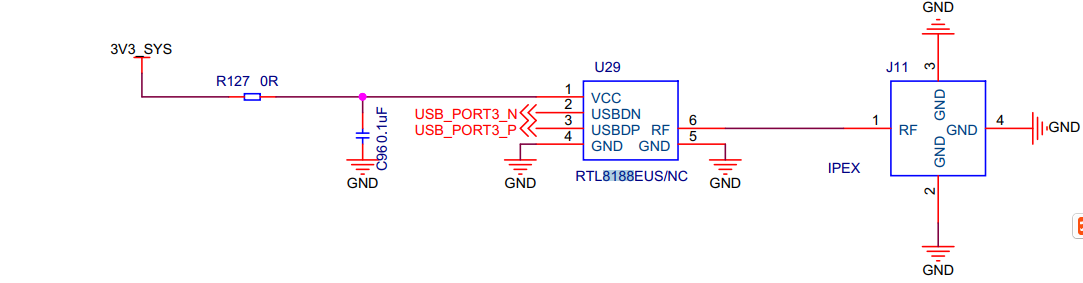
Figure 1 usb wifi rtl8188eus interface block diagram
4 Functional Description
4.1 Functional Block Diagram
It combines CMOSMAC,Baseband PHYand RF in a single chip for IEEE802.11/b/g/n compatible. It supports IEEE802.11i safety protocol, along with IEEE802.11e standard service quality. It supports the new data encryption on 64/128 bit WEP and safety mechanism on WPA-PSK/WPA2-PSK, WPA/WPA2.It can implement the wireless network function on the laptop/desktop/MID and other wireless devices easily
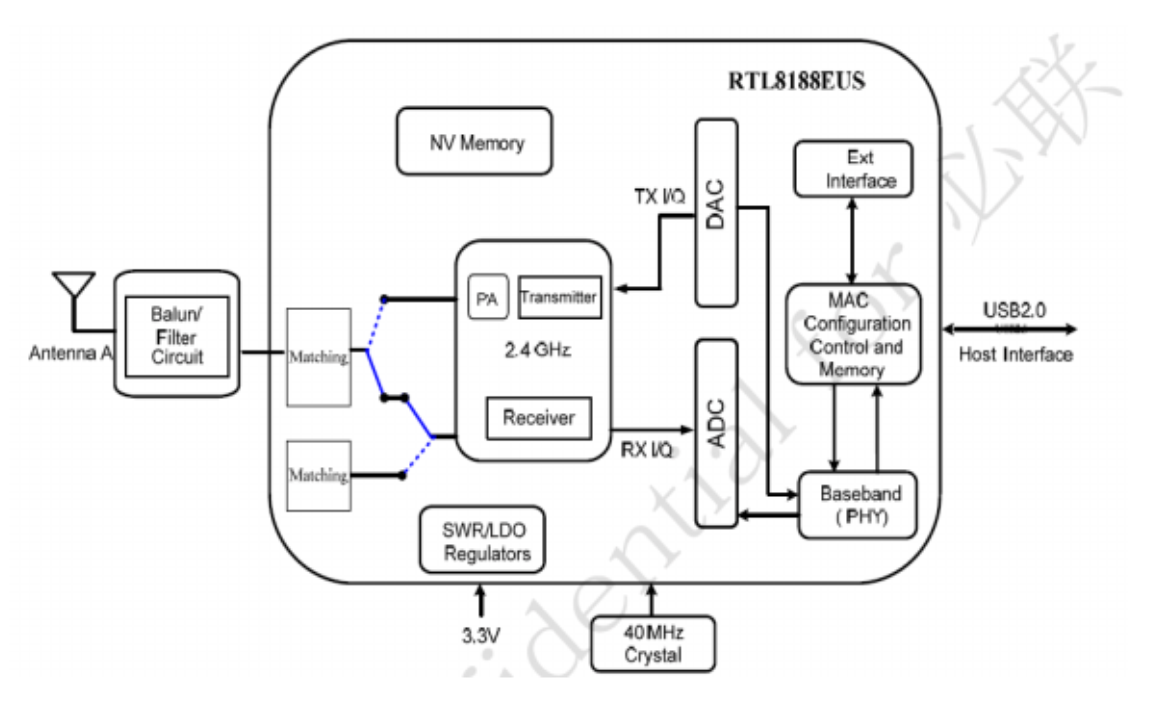
Figure 2 usb wifi rtl8188eus interface block diagram
4.2 RTL8188EUS
4.2.1 Overview
5 Porting
5.1 Kernel porting
+CONFIG_WIRELESS_EXT=y
+CONFIG_WEXT_PRIV=y
+CONFIG_WLAN_VENDOR_RSI=y
+CONFIG_CLKDEV_LOOKUP=y
+++ drivers/net/wireless/realtek/Kconfig
+source "drivers/net/wireless/realtek/rtl8188eus/Kconfig"
+++ drivers/net/wireless/realtek/Makefile
+obj-$(CONFIG_RTL8188EU) += rtl8188eus/
get driver from : https://github.com/quickreflex/rtl8188eus
add include/autoconf.h for support ap+sta ,but ap driver is not compatible with linux.4.14.y kernel version, beause of manufacturer no longer maintain rtl8188eus drivers. So ap mode not work properly….
+109 #define CONFIG_CONCURRENT_MODE
5.2 Application Interface
After the usb wifi rtl8188eus driver was loaded , we can find wlan0 wlan1 network devices

Kernel message:
[ 304.654082] 8188eu: loading out-of-tree module taints kernel.
[ 304.690852] RTL871X: module init start
[ 304.690875] RTL871X: rtl8188eu v4.3.0.8_13968.20150417
[ 304.691129] RTL871X:
usb_endpoint_descriptor(0):
[ 304.691139] RTL871X: bLength=7
[ 304.691145] RTL871X: bDescriptorType=5
[ 304.691152] RTL871X: bEndpointAddress=81
[ 304.691159] RTL871X: wMaxPacketSize=512
[ 304.691166] RTL871X: bInterval=0
[ 304.691173] RTL871X: RT_usb_endpoint_is_bulk_in = 1
[ 304.691179] RTL871X:
usb_endpoint_descriptor(1):
[ 304.691184] RTL871X: bLength=7
[ 304.691190] RTL871X: bDescriptorType=5
[ 304.691195] RTL871X: bEndpointAddress=2
[ 304.691201] RTL871X: wMaxPacketSize=512
[ 304.691206] RTL871X: bInterval=0
[ 304.691213] RTL871X: RT_usb_endpoint_is_bulk_out = 2
[ 304.691219] RTL871X:
usb_endpoint_descriptor(2):
[ 304.691224] RTL871X: bLength=7
[ 304.691230] RTL871X: bDescriptorType=5
[ 304.691235] RTL871X: bEndpointAddress=3
[ 304.691241] RTL871X: wMaxPacketSize=512
[ 304.691246] RTL871X: bInterval=0
[ 304.691252] RTL871X: RT_usb_endpoint_is_bulk_out = 3
[ 304.691260] RTL871X: nr_endpoint=3, in_num=1, out_num=2
[ 304.691266] RTL871X: USB_SPEED_HIGH
[ 304.691397] RTL871X: CHIP TYPE: RTL8188E
[ 304.691445] RTL871X: register rtw_netdev_ops to netdev_ops
[ 304.691465] RTL871X: rtw_wdev_alloc(padapter=d0ee9000)
[ 304.720692] RTL871X: Chip Version Info: CHIP_8188E_Normal_Chip_TSMC_A_CUT_1T1R_RomVer(0)
[ 304.720711] RTL871X: RF_Type is 3!!
[ 304.720726] RTL871X: _ConfigNormalChipOutEP_8188E OutEpQueueSel(0x05), OutEpNumber(2)
[ 304.720926] RTL871X: EEPROM type is E-FUSE
[ 304.720936] RTL871X: ====> _ReadAdapterInfo8188EU
[ 304.721015] RTL871X: Boot from EFUSE, Autoload OK !
[ 304.723461] RTL871X: SetHwReg8188EU: bMacPwrCtrlOn=1
[ 304.723693] bFWReady == _FALSE call reset 8051...
[ 304.724300] RTL871X: =====> _8051Reset88E(): 8051 reset success .
[ 304.739727] RTL871X: efuse_read_phymap_from_txpktbuf bcnhead:0
[ 304.740293] RTL871X: efuse_read_phymap_from_txpktbuf len:118, lenbak:118, aaa:118, aaabak:118
[ 304.754846] RTL871X: efuse_read_phymap_from_txpktbuf read count:116
[ 304.755152] RTL871X: EEPROM ID=0x8129
[ 304.755165] RTL871X: VID = 0x0BDA, PID = 0x8179
[ 304.755173] RTL871X: Customer ID: 0x00, SubCustomer ID: 0xCD
[ 304.755185] RTL871X: Hal_ReadPowerSavingMode88E...bHWPwrPindetect(0)-bHWPowerdown(0) ,bSupportRemoteWakeup(1)
[ 304.755192] RTL871X: ### PS params=> power_mgnt(0),usbss_enable(0) ###
[ 304.755202] RTL871X: ======= Path 0, Channel 1 =======
[ 304.755208] RTL871X: Index24G_CCK_Base[0][1] = 0x21
[ 304.755214] RTL871X: Index24G_BW40_Base[0][1] = 0x25
[ 304.755219] RTL871X: ======= Path 0, Channel 2 =======
[ 304.755225] RTL871X: Index24G_CCK_Base[0][2] = 0x21
[ 304.755230] RTL871X: Index24G_BW40_Base[0][2] = 0x25
[ 304.755236] RTL871X: ======= Path 0, Channel 3 =======
[ 304.755242] RTL871X: Index24G_CCK_Base[0][3] = 0x21
[ 304.755247] RTL871X: Index24G_BW40_Base[0][3] = 0x25
[ 304.755252] RTL871X: ======= Path 0, Channel 4 =======
[ 304.755258] RTL871X: Index24G_CCK_Base[0][4] = 0x21
[ 304.755263] RTL871X: Index24G_BW40_Base[0][4] = 0x25
[ 304.755269] RTL871X: ======= Path 0, Channel 5 =======
[ 304.755274] RTL871X: Index24G_CCK_Base[0][5] = 0x21
[ 304.755279] RTL871X: Index24G_BW40_Base[0][5] = 0x25
[ 304.755285] RTL871X: ======= Path 0, Channel 6 =======
[ 304.755290] RTL871X: Index24G_CCK_Base[0][6] = 0x21
[ 304.755296] RTL871X: Index24G_BW40_Base[0][6] = 0x25
[ 304.755301] RTL871X: ======= Path 0, Channel 7 =======
[ 304.755307] RTL871X: Index24G_CCK_Base[0][7] = 0x21
[ 304.755312] RTL871X: Index24G_BW40_Base[0][7] = 0x25
[ 304.755317] RTL871X: ======= Path 0, Channel 8 =======
[ 304.755323] RTL871X: Index24G_CCK_Base[0][8] = 0x21
[ 304.755328] RTL871X: Index24G_BW40_Base[0][8] = 0x25
[ 304.755333] RTL871X: ======= Path 0, Channel 9 =======
[ 304.755339] RTL871X: Index24G_CCK_Base[0][9] = 0x21
[ 304.755345] RTL871X: Index24G_BW40_Base[0][9] = 0x25
[ 304.755350] RTL871X: ======= Path 0, Channel 10 =======
[ 304.755356] RTL871X: Index24G_CCK_Base[0][10] = 0x21
[ 304.755362] RTL871X: Index24G_BW40_Base[0][10] = 0x25
[ 304.755367] RTL871X: ======= Path 0, Channel 11 =======
[ 304.755373] RTL871X: Index24G_CCK_Base[0][11] = 0x21
[ 304.755378] RTL871X: Index24G_BW40_Base[0][11] = 0x25
[ 304.755383] RTL871X: ======= Path 0, Channel 12 =======
[ 304.755389] RTL871X: Index24G_CCK_Base[0][12] = 0x1f
[ 304.755395] RTL871X: Index24G_BW40_Base[0][12] = 0x23
[ 304.755400] RTL871X: ======= Path 0, Channel 13 =======
[ 304.755405] RTL871X: Index24G_CCK_Base[0][13] = 0x1f
[ 304.755411] RTL871X: Index24G_BW40_Base[0][13] = 0x23
[ 304.755417] RTL871X: ======= Path 0, Channel 14 =======
[ 304.755422] RTL871X: Index24G_CCK_Base[0][14] = 0x1f
[ 304.755428] RTL871X: Index24G_BW40_Base[0][14] = 0x23
[ 304.755434] RTL871X: ======= TxCount 0 =======
[ 304.755440] RTL871X: CCK_24G_Diff[0][0]= 0
[ 304.755445] RTL871X: OFDM_24G_Diff[0][0]= 2
[ 304.755451] RTL871X: BW20_24G_Diff[0][0]= 0
[ 304.755457] RTL871X: BW40_24G_Diff[0][0]= 0
[ 304.755461] RTL871X: EEPROMRegulatory = 0x0
[ 304.755470] RTL871X: mlmepriv.ChannelPlan = 0x20
[ 304.755476] RTL871X: CrystalCap: 0x10
[ 304.755482] RTL871X: EEPROM Customer ID: 0x 0
[ 304.755490] RTL871X: EEPROM : AntDivCfg = 0, TRxAntDivType = 3
[ 304.755495] RTL871X: Board Type: 0x 0
[ 304.755500] RTL871X: ThermalMeter = 0x1a
[ 304.755508] RTL871X: <==== _ReadAdapterInfo8188EU in 30 ms
[ 304.755746] RTL871X: init_channel_set ChannelPlan ID 20 Chan num:13
[ 304.756621] RTL871X: pwrctrlpriv.bSupportRemoteWakeup~~~~~~
[ 304.756633] RTL871X: pwrctrlpriv.bSupportRemoteWakeup~~~[1]~~~
[ 304.756645] RTL871X: can't get autopm:
[ 304.756658] RTL871X: rtw_macaddr_cfg MAC Address = 00:11:7f:36:05:51
[ 304.756668] RTL871X: bDriverStopped:1, bSurpriseRemoved:0, bup:0, hw_init_completed:0
[ 304.756749] RTL871X: register rtw_netdev_ops to netdev_ops
[ 304.756763] RTL871X: register rtw_netdev_if2_ops to netdev_ops
[ 304.756848] RTL871X: rtw_wdev_alloc(padapter=d0f52000)
[ 304.787825] RTL871X: Chip Version Info: CHIP_8188E_Normal_Chip_TSMC_A_CUT_1T1R_RomVer(0)
[ 304.787844] RTL871X: RF_Type is 3!!
[ 304.787860] RTL871X: _ConfigNormalChipOutEP_8188E OutEpQueueSel(0x05), OutEpNumber(2)
[ 304.799518] RTL871X: init_channel_set ChannelPlan ID 20 Chan num:13
[ 304.800371] RTL871X: rtw_ndev_init(wlan0)
[ 304.822284] RTL871X: cfg80211_rtw_get_txpower
[ 304.835936] RTL871X: cfg80211_rtw_get_txpower
[ 304.844868] RTL871X: cfg80211_rtw_get_txpower
[ 304.845345] RTL871X: cfg80211_rtw_get_txpower
[ 304.845571] RTL871X: _rtw_drv_register_netdev, MAC Address (if1) = 00:11:7f:36:05:51
[ 304.845630] RTL871X: rtw_ndev_init(wlan1)
[ 304.846650] RTL871X: cfg80211_rtw_get_txpower
[ 304.853231] RTL871X: cfg80211_rtw_get_txpower
[ 304.853920] RTL871X: cfg80211_rtw_get_txpower
[ 304.854138] RTL871X: _rtw_drv_register_netdev, MAC Address (if2) = 02:11:7f:36:05:51
[ 304.854977] pwm-backlight backlight: GPIO lookup for consumer enable
[ 304.854990] pwm-backlight backlight: using device tree for GPIO lookup
[ 304.855016] of_get_named_gpiod_flags: can't parse 'enable-gpios' property of node '/backlight[0]'
[ 304.855029] of_get_named_gpiod_flags: can't parse 'enable-gpio' property of node '/backlight[0]'
[ 304.855038] pwm-backlight backlight: using lookup tables for GPIO lookup
[ 304.855049] pwm-backlight backlight: lookup for GPIO enable failed
[ 304.855077] pwm-backlight backlight: backlight supply power not found, using dummy regulator
[ 304.856092] usbcore: registered new interface driver rtl8188eu
[ 304.856103] RTL871X: module init ret=0
[ 305.247860] RTL871X: cfg80211_rtw_get_txpower
6 Follow-up
Sta mode test method:
root@IoTP:~# /etc/init.d/8188euSta connect panzidong 12345678
Starting 8188eu sta connectAPDRIVER = 8188eu
connect to AP_SSID : panzidong, AP_PASSWORD : 12345678
Successfully initialized wpa_supplicant
.
root@IoTP:~# script_runreason: /usr/libexec/dhcpcd-run-hooks: WEXITSTATUS 127
script_runreason: /usr/libexec/dhcpcd-run-hooks: WEXITSTATUS 127
wlan1: waiting for carrier
wlan1: carrier acquired
wlan1: adding address fe80::bede:af04:e62a:30c8
script_runreason: /usr/libexec/dhcpcd-run-hooks: WEXITSTATUS 127
DUID 00:01:00:01:1e:4f:73:1f:f8:36:9b:0b:cc:1b
wlan1: IAID 7f:36:05:51
wlan1: soliciting an IPv6 router
wlan1: soliciting a DHCP lease
root@IoTP:~# wlan1: offered 172.20.10.14 from 172.20.10.1 `panzidong'
wlan1: probing address 172.20.10.14/28
root@IoTP:~# wlan1: leased 172.20.10.14 for 85536 seconds
wlan1: adding route to 172.20.10.0/28
wlan1: adding default route via 172.20.10.1
script_runreason: /usr/libexec/dhcpcd-run-hooks: WEXITSTATUS 127
forked to background, child pid 1568
root@IoTP:~# ifconfig wlan1
wlan1 Link encap:Ethernet HWaddr 02:11:7f:36:05:51
inet addr:172.20.10.14 Bcast:172.20.10.15 Mask:255.255.255.240
inet6 addr: fe80::bede:af04:e62a:30c8/64 Scope:Link
UP BROADCAST RUNNING MULTICAST MTU:1500 Metric:1
RX packets:4 errors:0 dropped:53 overruns:0 frame:0
TX packets:19 errors:0 dropped:0 overruns:0 carrier:0
collisions:0 txqueuelen:1000
RX bytes:1078 (1.0 KB) TX bytes:2950 (2.9 KB)
am335x system upgrade usb wifi rtl8188eus(十九)的更多相关文章
- am335x system upgrade kernel f-ram fm25l16b(十六)
1 Scope of Document This document describes SPI F-RAM hardware design 2 Requiremen 2.1 ...
- am335x system upgrade kernel usb stroage(十)
1 Scope of Document This document describes USB hardware design, support stardard usb2.0 port o ...
- am335x system upgrade rootfs using yocto make rootfs(十二)
1 Scope of Document This document describes how to make am335x arago rootfs using ycoto project ...
- am335x system upgrade kernel gpio(九)
1 Hardware Overview gpio interface,pin map: AM335X_I2C0_W_C----------------------MCASP0_AXR1 /* ...
- am335x system upgrade rootfs for bridge-utils cross compile (十四)
bridge-utils移植 [目的] 移植bridge-utils的目是在AM335X开发板上使用bridge功能. [环境] 1. Ubuntu 16.04发行版 2. MC183平台 3. ...
- am335x system upgrade kernel emmc(十八)
1 Scope of Document This document describes EMMC hardware design 2 Requiremen 2.1 Func ...
- am335x system upgrade set/get current cpufreq(二十一)
1 Scope of Document This document describes am335x cpufreq technology insider. 2 Requireme ...
- am335x system upgrade kernel tf(五)
1 Scope of Document This document describes TF hardware design 2 Requiremen 2.1 Functi ...
- am335x system upgrade kernel can(八)
1 Scope of Document This document describes can bus hardware design and can bus driver developm ...
随机推荐
- Proxy 和aop
Proxy 就是代理,意思就是 你不用去做,别人代替你去处理 先来个静态代理 public interface Hello { void say(String name); } 被代理类 public ...
- 一、python快速入门(每个知识点后包含练习)
1. 编程与编程语言 编程的目的是什么? #计算机的发明,是为了用机器取代/解放人力,而编程的目的则是将人类的思想流程按照某种能够被计算机识别的表达方式传递给计算机,从而达到让计算机能够像人脑/电脑一 ...
- 彭博社:博通正在与赛门铁克洽谈收购事宜(博通能买得起 又能讲故事的 没几个了 为了刺激资本的兴趣 只能瞎搞 就和intel 收购 麦咖啡一样。就像杜蕾斯收购美赞臣一样,也许只是纯粹的商业行为,哪行赚钱干哪行)
彭博社今日消息,知名芯片制造商 Broadcom 公司正在就收购网络安全公司 Symantec 事宜进行高级会谈,因为 Broadcom 希望寻找半导体业务之外的机会,以实现多元化经营. 据称,在彭博 ...
- docker 入门3 - 服务 【翻译】
入门,第 3 部分:服务 先决条件 安装 Docker 版本 1.13 或更高版本. 获取 Docker Compose.在适用于 Mac 和 Docker 桌面的 Windows 上,它已预安装,因 ...
- shell使用ps -ef|grep xxx时不显示grep xxx进程的方法
在使用ps -ef|grep xxx时会将grep xxx的进程也带出来, 而在脚本中如果想要截取此命令结果的一部分,则grep xxx的进程会显得多余,如下: [root@localhost ~]# ...
- 使用Docker搭建MySQL服务
一.安装docker windows 和 mac 版可以直接到官网下载 docker desktop linux 的安装方法可以参考 https://www.cnblogs.com/myzony/p/ ...
- 关于Mybatis的几件小事(二)
一.MyBatis缓存机制 1.简介 Mybatis包含了一个非常强大的查询缓存的特性,它可以非常方便地配置和定制. 缓存key极大提高查询效率 MyBatis系统中默认定义了两次缓存 默认情况下,只 ...
- C#/.net 通过js调用系统相机进行拍照,图片无损压缩后进行二维码识别
这两天撸了一个需求,通过 JS 调用手机后置相机,进行拍照扫码.前台实现调用手机相机,然后截取图片并上传到后台的功能.后台接收传过来的图片后,通过调用开源二维码识别库 ZXing 进行二维码数据解析 ...
- STM32点亮LED
原理图 测试灯,接GPIO外设B,Pin 12 举例 前提,工程模版建立好 #include "stm32f10x.h" void delay(u32 i) { while(i-- ...
- com.android.ddmlib.adbcommandrejectedexception:未经授权的设备。
出现这种问题的原因是adb被杀死了,根据网上的说法在platform-tools下双击adb.exe 也启动不了. 在命令提示符中执行 adb kill-server adb start-ser ...