
使用 IntraWeb (22) - 基本控件之 TIWCalendar
TIWCalendar: 日历控件, 继承于 TIWCustomGrid, 所以它和 TIWGrid 共同属性特多.
它的 Cell 是 TIWCalendarCell 对象, 直接从 TIWGridCell 继承.
TIWCalendar 所在单元及继承链:
IWCompCalendar.TIWCalendar
主要成员:
property Cell[const ARow: Integer, const AColumn: Integer]: TIWCalendarCell //

property CurrentDayImage: TIWFileReference    //显示在当前日期的图片

property CaptionToday: string                 //当前日期的附加标题

property PreviousMonthImage: TIWFileReference //"后退"图片

property NextMonthImage: TIWFileReference     //"前进"图片

property CaptionPrevious: string          //"后退"标题

property CaptionNext: string              //"前进"标题

property CalendarHeaderColor: TIWColor    //标题背景色

property CalendarColor: TIWColor          //背景色

property AlternateCalendarColor: TIWColor //用于交替的背景色

property CheckerBoard: Boolean            //是否使用交替背景

property CalendarHeaderFont: TIWFont  //标题字体

property CalendarFont: TIWFont        //字体

property StartDate: TDateTime         //默认当前日期

property SelectedDate: TDateTime      //就是刚刚点过的日期

property DisplayYear: Boolean         //是否显示"年"

property LocaleID: Integer                 //本地语言 ID

property CellRenderOptions: TIWCellRenderOptions //

property BorderColors: TIWGridBorderColors //

property BGColor: TIWColor                 //

property BorderSize: Integer               //

property BorderStyle: TIWGridBorderStyle   //

property Caption: TCaption     //

property CellPadding: Integer  //

property CellSpacing: Integer  //

property Font: TIWFont         //

property Lines: TIWGridLines   //

property Summary: string       //

property UseFrame: Boolean     //

property UseSize: Boolean      //

property HiddenColumns: TStringList //

property OnDateChange: TIWCalendarDateChange     //

property OnGetDateInformation: TIWCalendarGetDateInformation  //

property OnGetDayNames: TIWCalendarGetDayNames   //

property OnGetMonthName: TIWCalendarGetMonthName //

property OnRenderCell: TIWOnRenderCell           //

property OnRender: TNotifyEvent                  //

property OnGetCellRenderOptions: TIWGetCellRenderOptionsEvent //

procedure SetHeaderCells;                                          //

function IsRowVisible(ARow: Integer): Boolean                      //

procedure SetColumnVisibility(AColumn: Integer; AVisible: Boolean) //
TIWCalendarCell:
{IWCompCalendar.TIWCalendarCell
改控件拖到窗体上就能用, 如果要写一行代码的话应该是: IWCalendar1.StartDate := Date;
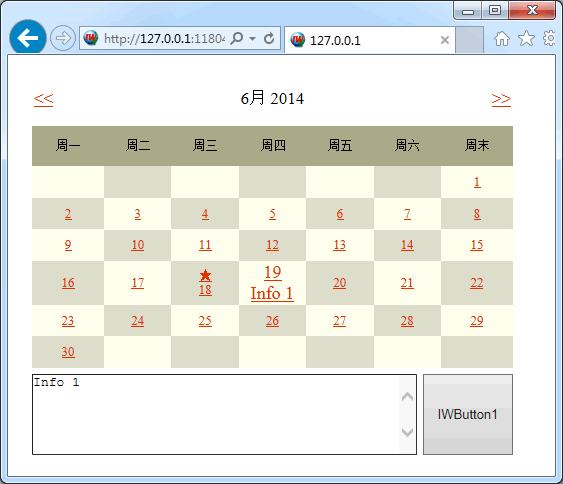
下面是个比较全面的测试:
var
gInfoList: TStrings; //用于记录自定义的备忘信息
procedure TIWForm1.IWAppFormCreate(Sender: TObject);
begin
gInfoList := TStringList.Create; //如果是长期保存, 它应该是从服务器上读取某个文件
IWCalendar1.Caption := ''; //标题无用
IWCalendar1.CaptionPrevious := '>';
IWCalendar1.CalendarHeaderColor := $88aaaa;
IWCalendar1.CalendarColor := $eeffff;
IWCalendar1.AlternateCalendarColor := $ccdddd; //交替颜色
IWCalendar1.CheckerBoard := True; //确认使用指定的 "交替颜色" 与背景色交替使用
IWCalendar1.CalendarFont.Size := 12;
LinkColor := $0033dd; //Cell 中的文本其实成了链接了, 如果要改变 Cell 中文本的显示, 最好使用 Css
IWCalendar1.CaptionToday := '★'; //突出标示当前日期, 或使用图像(CurrentDayImage)
IWCalendar1.StartDate := Date; //显然使用 Date 比 Now 更合理; 这句还能起到刷新的作用
end;
{通过 OnGetDayNames 事件调整周标题显示}
procedure TIWForm1.IWCalendar1GetDayNames(var Sunday, Monday, Tuesday, Wednesday, Thursday, Friday, Saturday: string);
begin
Sunday := '周末';
end;
{通过 OnGetMonthName 事件调整月份显示}
procedure TIWForm1.IWCalendar1GetMonthName(MonthNumber: Integer; var MonthName: string);
begin
MonthName := MonthNumber.ToString + '月';
end;
{通过 OnRenderCell 事件调整更多显示细节}
procedure TIWForm1.IWCalendar1RenderCell(ACell: TIWGridCell; const ARow, AColumn: Integer);
begin
{让当前选定的日期在字号上有所区别}
if TIWCalendarCell(ACell).CellDate = TIWCalendar(ACell.Grid).SelectedDate then
ACell.Font.Size := 14
else
ACell.Font.Size := ACell.Grid.Font.Size;
{ARow = 0 是最上面一行, 也就是带月导航的那行}
if ARow = 0 then ACell.Font.Size := 13;
{Arow = 1 是周标题}
if ARow = 1 then ACell.Height := '20'; //Height 是 字符串在 Html 中不难理解
end;
{添加和日期关联的备注信息}
procedure TIWForm1.IWButton1AsyncClick(Sender: TObject; EventParams: TStringList);
begin
gInfoList.Values[FormatDateTime('ddmmyyyy', IWCalendar1.SelectedDate)] := IWMemo1.Text;
end;
{选择不同日期时再取回备注信息}
procedure TIWForm1.IWCalendar1DateChange(ADate: TDateTime);
begin
IWMemo1.Text := gInfoList.Values[FormatDateTime('ddmmyyyy', ADate)];
end;
{通过切换月份, 可以看到刚添加的与日期关联的备注信息}
procedure TIWForm1.IWCalendar1GetDateInformation(ADate: TDateTime; VInformation: TStrings);
begin
VInformation.Text := gInfoList.Values[FormatDateTime('ddmmyyyy', ADate)];
end;
procedure TIWForm1.IWAppFormDestroy(Sender: TObject);
begin
gInfoList.Free;
end;
效果图:
使用 IntraWeb (22) - 基本控件之 TIWCalendar的更多相关文章
- 使用 IntraWeb (24) - 基本控件之 TIWFileUploader、TIWFile
TIWFileUploader 是基于 Ajax 的上传控件, 最初是 Andrew Valums 开发, 从 IntraWeb XIV 纳入并替换 TIWFile. 虽然从组件面板上还能看到 TIW ...
- 使用 IntraWeb (29) - 基本控件之 TIWAutherList、TIWAutherINI、TIWAutherEvent
TIWAutherList //通过一组户名与密码验证登陆 TIWAutherINI //通过记录户名与密码信息的 #Auth.ini 文件验证登陆 TIWAutherEvent //通过其 OnCh ...
- 使用 IntraWeb (28) - 基本控件之 TIWTemplateProcessorHTML、TIWLayoutMgrHTML、TIWLayoutMgrForm
TIWTemplateProcessorHTML //使用外部的 html 文件做模板 TIWLayoutMgrHTML //直接输入 Html 文本做模板 TIWLayoutMgrForm //这应 ...
- 使用 IntraWeb (26) - 基本控件之 TIWMenu
TIWMenu 的任务是让原来的 TMainMenu 呈现在网页上, 通过其 AttachedMenu 属性关联一个 TMainMenu 是必需的. TIWMenu 所在单元及继承链: IWCompM ...
- 使用 IntraWeb (25) - 基本控件之 TIWRegion
这应该是 IW 中最重要的容器了, 和它同父的还有 TIWTabControl TIWRegion 所在单元及继承链: IWRegion.TIWRegion 主要成员: property Align: ...
- 使用 IntraWeb (23) - 基本控件之 TIWTimer、TIWProgressBar、TIWProgressIndicator、TIWTimeEdit
TIWTimer //和 TTimer 没多大区别, 它的默认事件现在是异步的(OnAsyncTimer), 在网络上使用 OnTimer 肯定是非常糟糕的 TIWProgressBar //进度条 ...
- 使用 IntraWeb (20) - 基本控件之 TIWGrid
TIWGrid 最终通过 Html Table 呈现; 其每个 Cell 都是一个 TIWGridCell 对象, Cell 对象的 Control 属性非常好, 可以非常方便地嵌入其他控件. TIW ...
- 使用 IntraWeb (19) - 基本控件之 TIWTreeView
这是个饱受非议的控件; 我通过尝试, 理解了非议, 也能理解作者. 总之向作者的思路靠拢吧, 还是不错的. TIWTreeView 所在单元及继承链: IWCompTreeview.TIWTreeVi ...
- 使用 IntraWeb (16) - 基本控件之 TIWList、TIWListbox、TIWComboBox、TIWOrderedListbox
TIWList //列表; 它对应 Html 中的 OL.LI(某些选项下会用表格模拟); TIWListbox 和 TIWComboBox 则对应 Html 在的 Option TIWListbox ...
随机推荐
- Python程序员之面试必回习题
写在前面 近日恰逢学生毕业季,课程后期大家“期待+苦逼”的时刻莫过于每天早上内容回顾和面试题问答部分[临近毕业每天课前用40-60分钟对之前内容回顾.提问和补充,专挑班里不爱说话就的同学回答]. 期待 ...
- caoha
- 经典sql-获取当前文章的上一篇和下一篇
我们在做资讯类的网站的时候,肯定会有这么一个需求,就是在资讯内容页的下方需要给出上一篇和下一篇资讯的链接.上次我一同事兼好友兼室友就遇到了这么一个需求,一开始我们都把问题想复杂了,先取的是符合条件的资 ...
- 安装Scrapy遇到的坑
安装过程怕是要吐血,架梯子等等结果被setuptools的版本给坑了. 参考网址: http://blog.csdn.net/YHYR_YCY/article/details/78876148 htt ...
- Eclipse 中 不能创建 Dynamic web project
工作要涉及web开发,之前下载的java SE (我的是luna) 版本默认无法新建web项目,也就是找不到Dynamic Web ,在网上看了些解决办法,最终却是解决了问题,说到底就是安装一些用于E ...
- Android P 功能和 API
Android P 功能和 API Android P 为用户和开发者引入众多新特性和新功能. 本文重点介绍面向开发者的新功能. 要了解新 API,请阅读 API 差异报告或访问 Android AP ...
- 利用CSS改变输入框的光标颜色
转:http://www.cnblogs.com/gymmer/p/6810367.html 代码: <!DOCTYPE html> <html lang="en" ...
- node+webpack环境搭建 vue.js 2.0 基础学习笔记
npm install -g vue //全局安装vue npm install -g webpack //全局安装webpack npm install -g vue-cli //全局安装vue-c ...
- 打开文件或者uri的方式--------进程启动文件和启动者启动文件
The Process class in System.Diagnostics allows you to launch a new process.For security reasons, t ...
- USING NHIBERNATE WITH MySQL
In previous USING NHIBERNATE WITH SQLITE, we connect SQLITE with ORM framework NHibernate. One of th ...