
spring boot 与 thymeleaf (4): 基本对象、工具类对象
如果在前台, 我需要获取session中的信息, 或者需要获取url中的参数信息, 是不是需要在后台手动处理好, 然后放到Model中去, 在前台通过${}来取呢?
当然, 这种方式, 是可以的, 但是比较麻烦, 而且, 别人已经考虑到这个了, 我们直接用就可以了.
一. 基本对象
| #ctx | 上下文对象 |
| #vars | 上下文对象(和#ctx相同, 但是一般用#ctx) |
| #locale | 上下文区域设置 |
| #request | (仅在Web Contexts中) HttpServletRequest对象 |
| #response | (仅在Web Contexts中) HttpServletResponse对象 |
| #session | (仅在Web Contexts中) HttpSession对象 |
| #servletContext | (仅在Web Contexts中) ServletContext对象 |
1. 数据准备
package org.elvin.learn.springboot.controller;

import org.elvin.learn.springboot.pojo.Book;

import org.joda.time.DateTime;

import org.springframework.beans.factory.annotation.Autowired;

import org.springframework.stereotype.Controller;

import org.springframework.ui.Model;

import org.springframework.web.bind.annotation.GetMapping;

import org.springframework.web.bind.annotation.RequestMapping;

import org.springframework.web.bind.annotation.ResponseBody;

import org.thymeleaf.util.MapUtils;

import javax.servlet.http.HttpServletRequest;

import javax.servlet.http.HttpServletResponse;

import javax.servlet.http.HttpSession;

import java.util.*;

@Controller

@RequestMapping("thy")

public class ThyController {

    @Autowired

    private HttpServletResponse response;

    @Autowired

    private HttpServletRequest request;

    @GetMapping("index")

    public String index(Model model) {

        Book book = new Book("springmvc", new DateTime().toString("yyyy-MM-dd"), 10000L);

        model.addAttribute("book", book);

        HttpSession session = request.getSession();

        session.setAttribute("session1", "lalala");

        return "thy/index";

    }

}
2. request / param
<div class="panel panel-primary">

    <div class="panel-heading">

        <h3 class="panel-title">reqeust</h3>

    </div>

    <div class="panel-body">

        <p th:text="${#request.getContextPath()}"></p>

        <div th:each="item : ${#request.getParameterNames()}">

            <p th:text="|name : ${item}, value : ${#request.getParameter(item)}|"></p>

        </div>

        <hr />

        <p th:text="|size : ${param.size()}, lang: ${param.lang}, arr: ${param.arr}, arr-first: ${param.arr[1]}|"></p>

    </div>

</div>
#request -> HttpServletRequest 对象.
param : 用来获取请求参数的.
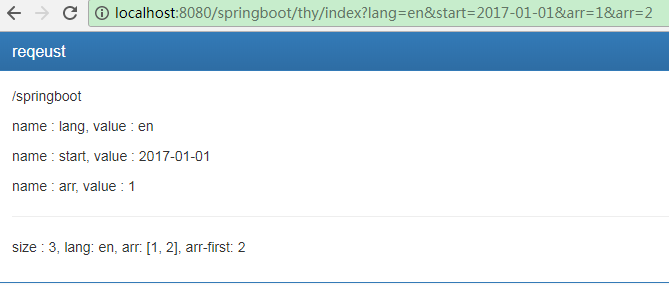
param可以通过直接点的方式, 来访问参数. 是非常方便的
除了size()方法, 还有 isEmpty() , containsKey('...')两个常用方法
2. session
html:
<div class="panel panel-primary">

    <div class="panel-heading">

        <h3 class="panel-title">session</h3>

    </div>

    <div class="panel-body">

        <p th:text="${#session.getAttribute('session1')}"></p>

        <p th:text="|size : ${session.size()} , value : ${session.session1} |"></p>

        <div th:each="item : ${#session.getAttributeNames()}">

            <p th:text="|name : ${item}, value : ${#session.getAttribute(item)}|"></p>

        </div>

    </div>

</div>
结果:
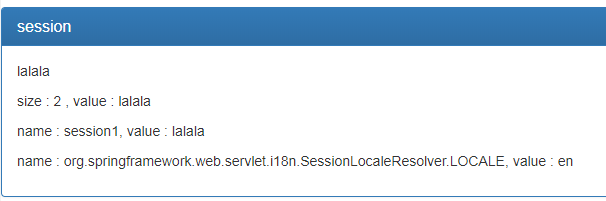
#session -> HttpSession对象
session和param一样, 都可以通过点的方式来获取session, 除了size()方法, 还有 isEmpty() , containsKey('...')两个常用方法
3. 上下文对象 #ctx
ctx主要看 IContext 接口.
package org.thymeleaf.context;

import java.util.Locale;

import java.util.Set;

public interface IContext {

    Locale getLocale();

    boolean containsVariable(String var1);

    Set<String> getVariableNames();

    Object getVariable(String var1);

}
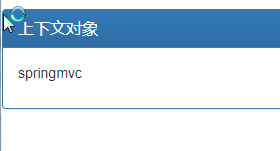
在后台写入Model的内容, 在前台都可以通过#ctx来获取
<div class="panel panel-primary">

    <div class="panel-heading">

        <h3 class="panel-title">上下文对象</h3>

    </div>

    <div class="panel-body">

        <p th:text="${#ctx.getVariable('book').name}"></p>

    </div>

</div>
在后台传入一个集合或者一个字符串, 在前台使用时, 如果不知道集合,字符串是否为空, 是不是会导致一些问题呢?
那如果会导致问题, 那么在前台是否有方法来解决这些问题呢?
这里需要借助一些工具类, 来辅助判断.
二. 工具类对象
| #execInfo | 有关正在处理的模板的信息 |
| #messages | 用于在变量表达式中获取外部化消息的方法, 与使用#{...}语法获得的方式相同 |
| #uris | 转义 URL / URI 部分的方法 |
| #conversions | 执行配置的转换服务(如果有的话)的方法 |
| #dates | java.util.Date对象的方法: 格式化, 组件提取等 |
| #calendars | java.util.Calendar对象, 类似于#dates |
| #numbers | 用于格式化数字对象的方法 |
| #strings | String对象的方法: contains, startsWith, prepending, appending等 |
| #objects | 一般对象的方法 |
| #bools | 布尔评估的方法 |
| #arrays | 数组的方法 |
| #lists | 列表的方法 |
| #sets | 集合的方法 |
| #maps | map方法 |
| #aggregates | 在数组或集合上创建聚合的方法 |
| #ids | 处理可能重复的id属性的方法 |
具体的使用方法, 可以通过 ctrl + 鼠标左键点击 的方式, 进类里面查看.
spring boot 与 thymeleaf (4): 基本对象、工具类对象的更多相关文章
- Spring Boot2 系列教程(九)Spring Boot 整合 Thymeleaf
虽然现在慢慢在流行前后端分离开发,但是据松哥所了解到的,还是有一些公司在做前后端不分的开发,而在前后端不分的开发中,我们就会需要后端页面模板(实际上,即使前后端分离,也会在一些场景下需要使用页面模板, ...
- 极简 Spring Boot 整合 Thymeleaf 页面模板
虽然现在慢慢在流行前后端分离开发,但是据松哥所了解到的,还是有一些公司在做前后端不分的开发,而在前后端不分的开发中,我们就会需要后端页面模板(实际上,即使前后端分离,也会在一些场景下需要使用页面模板, ...
- 一个小demo熟悉Spring Boot 和 thymeleaf 的基本使用
目录 介绍 零.项目素材 一. 创建 Spring Boot 项目 二.定制首页 1.修改 pom.xml 2.引入相应的本地 css.js 文件 3.编辑 login.html 4.处理对 logi ...
- Spring Boot整合Thymeleaf模板引擎
什么是Thymeleaf Thymeleaf是一款用于渲染XML.XHTML.HTML5内容的模板引擎.类似Velocity,FreeMaker模板引擎,它也可以轻易的与Spring MVC等Web框 ...
- 兼容 Spring Boot 1.x 和 2.x 配置类参数绑定的工具类 SpringBootBindUtil
为了让我提供的通用 Mapper 的 boot-starter 同时兼容 Spring Boot 1.x 和 2.x,增加了这么一个工具类. 在 Spring Boot 中,能够直接注入 XXProp ...
- Spring Boot整合 Thymeleaf 模板引擎
什么是Thymeleaf Thymeleaf是一款用于渲染XML.XHTML.HTML5内容的模板引擎.类似Velocity,FreeMaker模板引擎,它也可以轻易的与Spring MVC等Web框 ...
- Spring Boot(十五):spring boot+jpa+thymeleaf增删改查示例
Spring Boot(十五):spring boot+jpa+thymeleaf增删改查示例 一.快速上手 1,配置文件 (1)pom包配置 pom包里面添加jpa和thymeleaf的相关包引用 ...
- spring boot 与 thymeleaf (2): 常用表达式
在asp.net mvc 中, 有一个视图解析器, 可以支持Razor语法. 使用起来, 是非常的方便, 并且, 写在前台页面的后台方法, 是可调试的. 但是在java中, 目前我还没有接触到, 像. ...
- Spring Boot 2 + Thymeleaf:表单字段绑定、表单提交处理
Spring Boot中Thymeleaf对表单处理的一些用法:(1)使用th:field属性:进行表单字段绑定(2)使用ids对象:一般用于lable配合radio或checkbox使用(3)表单提 ...
随机推荐
- concurrent.future
concurrent.future module provides a high-level interface for asynchronously executing callables. Bas ...
- Alpha阶段敏捷冲刺(四)
1.站立式会议 提供当天站立式会议照片一张 2.每个人的工作 (有work item 的ID),并将其记录在码云项目管理中: 昨天已完成的工作. 祁泽文:实现了统计的基本按钮和界面. 徐璐琳:找到&q ...
- 转载:Java项目读取配置文件时,FileNotFoundException 系统找不到指定的文件,System.getProperty("user.dir")的理解
唉,读取个文件,也就是在项目里面去获得配置文件的目录,然后,变成文件,有事没事,总是出个 FileNotFoundException 系统找不到指定的文件,气死人啦. 还有就是:System.get ...
- codeforces877c
C. Slava and tanks time limit per test 2 seconds memory limit per test 256 megabytes input standard ...
- django天天生鲜项目
.后台admin管理天天生鲜商品信息 models里 from django.db import modelsfrom tinymce.models import HTMLField #需要pip安装 ...
- nips 2016 吴恩达
一年一度的 NIPS 又来了.今年举办地是笔者最爱的欧洲城市巴塞罗那.阳光沙滩配学术,确实很爽.这次的会议的第一天开场的大部分时间安排给了 tutorial.其中人数爆满的依旧是吴恩达(AndrewN ...
- 深入探索AngularJS
目录 深入探索AngularJS 作用域Scope是DOM和Directives交互的抽象 Scope是POJO对象 Scope是上下文 Scope继承树 Scope附加功能 正交功能 Element ...
- wpf APlayer 播放
效果图: 进入 迅雷开发者中心 下载最新SDK与解码库 注:解压最新SDK,运行install.bat. 解压完美解码库将codecs文件拷贝到项目Debug下 源码地址 :链接:https://pa ...
- 【JavaScript】js 中一些需要注意的问题
关于js中逻辑运算符 sort()方法 1. 关于js中逻辑运算符:|| 和 && 在js逻辑运算中,0."".null.false.undefined.NaN都会 ...
- [leetcode.com]算法题目 - Sqrt(x)
Implement int sqrt(int x). Compute and return the square root of x. class Solution { public: int sqr ...