
Java课程设计 学生基本信息管理个人博客
学生基本信息管理系统个人博客
团队课程设计链接
http://www.cnblogs.com/ll321/p/7067598.html
个人负责模块
负责部分界面设计,处理代码;
处理部分数据库数据。
自己的代码提交记录截图

自己负责模块或任务详细说明
数据库数据删除(在删除界面把数据库数据删除)
package database;

import java.sql.SQLException;

public class DELETE {

	public static String[][] delete(String name){

		String str ="delete from students where name="+"'"+name+"'"+";";

		String[][] strs = new String[100][8];

		try{

			DBUtil.exec(str);

		}catch (ClassNotFoundException e) {

			// TODO Auto-generated catch block

			e.printStackTrace();

		} catch (SQLException e) {

			// TODO Auto-generated catch block

			e.printStackTrace();

		}

		return strs;

	}

}
图形界面设计和处理
1.搜索界面设计(把数据库的数据输送到图形界面)
public SearchJFrame() {

        initComponents();

    }

private void Button1ActionPerformed(java.awt.event.ActionEvent evt) {

String name = TextField1.getText().trim();

     if(name.length()==0){

     JOptionPane.showMessageDialog(null,"输入不能为空!");

                                }

        else{

        String[][] strs = SEARCH.serach(name);

        for (int i = 0; i < 10; i++) {

        	for (int j = 0; j < 8; j++) {

        		System.out.print(strs[i][j] + " ");

        	}

        	System.out.println();

        }

        ImformationJFrame ImformationJFrame = new ImformationJFrame(strs);

        ImformationJFrame.setVisible(true);

        this.setVisible(false);

        }

    }

       private void Button2ActionPerformed(java.awt.event.ActionEvent evt) {

       MainJFrame MainJFrame = new MainJFrame();

       MainJFrame.setVisible(true);

       this.setVisible(false);

    }

    public static void main(String args[]) {

        /* Set the Nimbus look and feel */

        //<editor-fold defaultstate="collapsed" desc=" Look and feel setting code (optional) ">

        /* If Nimbus (introduced in Java SE 6) is not available, stay with the default look and feel.

         * For details see http://download.oracle.com/javase/tutorial/uiswing/lookandfeel/plaf.html

         */

        try {

            for (javax.swing.UIManager.LookAndFeelInfo info : javax.swing.UIManager.getInstalledLookAndFeels()) {

                if ("Nimbus".equals(info.getName())) {

                    javax.swing.UIManager.setLookAndFeel(info.getClassName());

                    break;

                }

            }

        } catch (ClassNotFoundException ex) {

            java.util.logging.Logger.getLogger(SearchJFrame.class.getName()).log(java.util.logging.Level.SEVERE, null, ex);

        } catch (InstantiationException ex) {

            java.util.logging.Logger.getLogger(SearchJFrame.class.getName()).log(java.util.logging.Level.SEVERE, null, ex);

        } catch (IllegalAccessException ex) {

            java.util.logging.Logger.getLogger(SearchJFrame.class.getName()).log(java.util.logging.Level.SEVERE, null, ex);

        } catch (javax.swing.UnsupportedLookAndFeelException ex) {

            java.util.logging.Logger.getLogger(SearchJFrame.class.getName()).log(java.util.logging.Level.SEVERE, null, ex);

        }

}


2.添加界面设计(把输入的数据输送到数据库)
public class AddJFrame extends javax.swing.JFrame {

    public AddJFrame() {

        initComponents();

    }

    private void initComponents() {

        setDefaultCloseOperation(javax.swing.WindowConstants.EXIT_ON_CLOSE);

        AddButton.setText("添加");

        AddButton.addActionListener(new java.awt.event.ActionListener() {

            public void actionPerformed(java.awt.event.ActionEvent evt) {

                try {

					AddButtonActionPerformed(evt);

				} catch (SQLException e) {

					// TODO Auto-generated catch block

					e.printStackTrace();

				}

            }

        });

        Button2.setText("返回");

        Button2.addActionListener(new java.awt.event.ActionListener() {

            public void actionPerformed(java.awt.event.ActionEvent evt) {

                Button2ActionPerformed(evt);

            }

        });

        pack();

    }

    private void AddButtonActionPerformed(java.awt.event.ActionEvent evt) throws SQLException {

       String number = TextField1.getText().trim();

       String name = TextField2.getText().trim();

       String gender = TextField3.getText().trim();

       String birthdate = TextField4.getText().trim();

       String politics = TextField5.getText().trim();

       String address = TextField6.getText().trim();

       String telephone = TextField7.getText().trim();

       String dormitory = TextField8.getText().trim();

       if(number.length()==0||name.length()==0||gender.length()==0||birthdate.length()==0||politics.length()==0||address.length()==0||telephone.length()==0||dormitory.length()==0){

           JOptionPane.showMessageDialog(null, "有数据为空!!");

       }

       else{

    	   ADD.add(number, name, gender, birthdate, politics, address, telephone, dormitory);

    	    JOptionPane.showMessageDialog(null, "添加成功!");

    }

    }

	private void Button2ActionPerformed(java.awt.event.ActionEvent evt) {

        MainJFrame MainJFrame = new MainJFrame();

        MainJFrame.setVisible(true);

        this.setVisible(false);

    }

    public static void main(String args[]) {

        try {

            for (javax.swing.UIManager.LookAndFeelInfo info : javax.swing.UIManager.getInstalledLookAndFeels()) {

                if ("Nimbus".equals(info.getName())) {

                    javax.swing.UIManager.setLookAndFeel(info.getClassName());

                    break;

                }

            }

        } catch (ClassNotFoundException ex) {

            java.util.logging.Logger.getLogger(AddJFrame.class.getName()).log(java.util.logging.Level.SEVERE, null, ex);

        } catch (InstantiationException ex) {

            java.util.logging.Logger.getLogger(AddJFrame.class.getName()).log(java.util.logging.Level.SEVERE, null, ex);

        } catch (IllegalAccessException ex) {

            java.util.logging.Logger.getLogger(AddJFrame.class.getName()).log(java.util.logging.Level.SEVERE, null, ex);

        } catch (javax.swing.UnsupportedLookAndFeelException ex) {

            java.util.logging.Logger.getLogger(AddJFrame.class.getName()).log(java.util.logging.Level.SEVERE, null, ex);

        }

        java.awt.EventQueue.invokeLater(new Runnable() {

            public void run() {

                new AddJFrame().setVisible(true);

            }

        });

    }

}


3.删除界面设计(将数据库的数据删除)
private void Button2ActionPerformed(java.awt.event.ActionEvent evt) {

        MainJFrame MainJFrame = new MainJFrame();

        MainJFrame.setVisible(true);

        this.setVisible(false);

    }

    private void Button1ActionPerformed(java.awt.event.ActionEvent evt) {

         String number = TextField1.getText().trim();

       String name = TextField2.getText().trim();

        if(name.length()==0&&number.length()==0){

           JOptionPane.showMessageDialog(null,"输入不能为空!" );

        }

        else{

        	database.DELETE.delete(name);

        }

    }

    public static void main(String args[]) {

        try {

            for (javax.swing.UIManager.LookAndFeelInfo info : javax.swing.UIManager.getInstalledLookAndFeels()) {

                if ("Nimbus".equals(info.getName())) {

                    javax.swing.UIManager.setLookAndFeel(info.getClassName());

                    break;

                }

            }

        } catch (ClassNotFoundException ex) {

            java.util.logging.Logger.getLogger(DeleteJFrame.class.getName()).log(java.util.logging.Level.SEVERE, null, ex);

        } catch (InstantiationException ex) {

            java.util.logging.Logger.getLogger(DeleteJFrame.class.getName()).log(java.util.logging.Level.SEVERE, null, ex);

        } catch (IllegalAccessException ex) {

            java.util.logging.Logger.getLogger(DeleteJFrame.class.getName()).log(java.util.logging.Level.SEVERE, null, ex);

        } catch (javax.swing.UnsupportedLookAndFeelException ex) {

            java.util.logging.Logger.getLogger(DeleteJFrame.class.getName()).log(java.util.logging.Level.SEVERE, null, ex);

        }

        java.awt.EventQueue.invokeLater(new Runnable() {

            public void run() {

                new DeleteJFrame().setVisible(true);

            }

        });

}
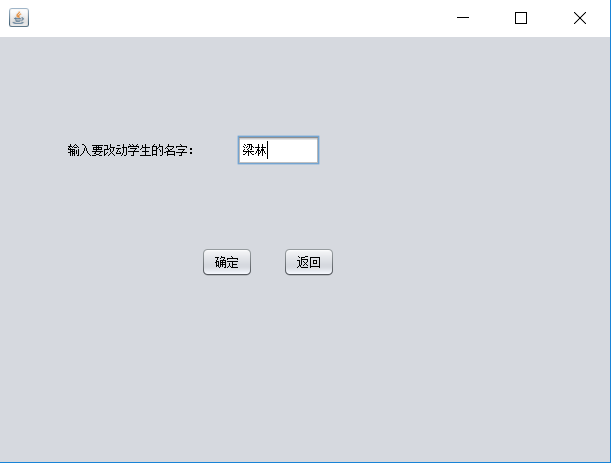
4.修改界面设计(修改数据库的数据内容)
    private void Button1ActionPerformed(java.awt.event.ActionEvent evt) {

      String number = TextField1.getText().trim();

      String name = TextField2.getText().trim();

        String gender = TextField3.getText().trim();

         String birthdate = TextField4.getText().trim();

          String politics = TextField5.getText().trim();

           String address = TextField6.getText().trim();

            String telephone = TextField7.getText().trim();

             String dormitory = TextField8.getText().trim();

              CHANGE.change(number,name,gender, birthdate, politics, address, telephone, dormitory);

    }

    private void Button2ActionPerformed(java.awt.event.ActionEvent evt) {

        MainJFrame MainJFrame = new MainJFrame();

        MainJFrame.setVisible(true);

        this.setVisible(false);

    }

    public static void main(String args[]) {

        try {

            for (javax.swing.UIManager.LookAndFeelInfo info : javax.swing.UIManager.getInstalledLookAndFeels()) {

                if ("Nimbus".equals(info.getName())) {

                    javax.swing.UIManager.setLookAndFeel(info.getClassName());

                    break;

                }

            }

        } catch (ClassNotFoundException ex) {

            java.util.logging.Logger.getLogger(ChangeJFrame.class.getName()).log(java.util.logging.Level.SEVERE, null, ex);

        } catch (InstantiationException ex) {

            java.util.logging.Logger.getLogger(ChangeJFrame.class.getName()).log(java.util.logging.Level.SEVERE, null, ex);

        } catch (IllegalAccessException ex) {

            java.util.logging.Logger.getLogger(ChangeJFrame.class.getName()).log(java.util.logging.Level.SEVERE, null, ex);

        } catch (javax.swing.UnsupportedLookAndFeelException ex) {

            java.util.logging.Logger.getLogger(ChangeJFrame.class.getName()).log(java.util.logging.Level.SEVERE, null, ex);

        }

        java.awt.EventQueue.invokeLater(new Runnable() {

            public void run() {

                new ChangeJFrame().setVisible(true);

            }

        });

}


课程设计感想
通过这次的课程设计,我认识到了自己的不足之处,对于一部分知识掌握的还不是很好,还有很多的欠缺之处,需要自己不断的改进。而且在这次课设的过程中,大大地提升了对net beans 和数据库的使用熟练度,有了很大收获。
Java课程设计 学生基本信息管理个人博客的更多相关文章
- Java课程设计 学生基本信息管理系统 团队博客
学生基本信息管理系统团队博客 项目git地址 https://git.oschina.net/Java_goddess/kechengsheji 项目git提交记录截图 项目功能架构图与主要功能流程图 ...
- java课程设计--猜数字(团队博客)
java课程设计--猜数字(团队博客) 1.团队名称以及团队成员介绍 团队名称:cz 团队成员:陈伟泽,詹昌锦 团队照片: 2.项目git地址 http://git.oschina.net/Devil ...
- JAVA课程设计——团队(&个人)博客
JAVA课程设计--团队(&个人)博客 1. 团队名称.团队成员介绍(需要有照片) 团队名称:是独立小分队啦 团队成员介绍:包梦榕 网络1513 201521123068 2. 项目git地址 ...
- Java课程设计——学生基本信息管理
1.团队名称.团队成员介绍 团队名称:学生基本信息管理设计小组 团队成员:花雨芸(组长)--负责管理界面的编写 丁蓉(组员)--负责登陆的设计编写 2.项目git地址 https://git.osch ...
- Java课程设计-学生基本信息管理 201521123036
团队课程设计博客链接 团队博客链接 个人负责模块或任务说明 个人负责模块 任务说明 用户登录,注册 登录,注册,判断用户是否存在,添加用户 学生信息管理菜单 按钮,跳转相应界面,退出程序 学生信息添加 ...
- Java课程设计 - 学生基本信息管理
团队名称.团队成员介绍(需要有照片) 团队名称:此艺兴非彼艺兴 团队成员: 王兴:女,积极上进 曾艺佳:女,积极上进 项目git地址 StudentManage项目 项目git提交记录截图(要体现出每 ...
- Java课程设计 购物车系统(个人博客) 201521123052 蓝锦明
1. 团队课程设计博客链接 课程设计团队博客 2. 个人负责模块或任务说明 (1)制作图形菜单引导界面 (2)定义各获取和输出类函数 3. 自己的代码提交记录截图 4. 自己负责模块或任务详细说明 i ...
- JAVA课设 学生基本信息管理 团队博客
1.成员 邹其元 网络1512 201521123060 杨钧宇 网络1512 201521123062 2.项目Git地址 团队项目码云地址 //添加截图 3. 项目git提交记录截图(要体现出每个 ...
- Java课程设计 猜数游戏个人博客
1.团队课程设计博客链接 http://www.cnblogs.com/tt1104/p/7064349.html 2.个人负责模块或任务说明 1.成绩排行榜算法的设计: 2.排行榜存放到文件中, 3 ...
随机推荐
- Selenium2 (python)
包名:selenium 支持浏览器:Firefox,InternetExplorerDriver,OperaDriver,Chrome(要使用一种浏览器应下载相应的driver驱动) 一.基本命令 d ...
- javascript多种方法实现数组去重
先说说这个实例的要求:写一个方法实现数组的去重.(要求:执行方法,传递一个数组,返回去重后的新数组,原数组不变,实现过程中只能用一层循环,双层嵌套循环也可写,只做参考): 先给初学者解释一下什么叫数组 ...
- [js高手之路] dom常用API【appendChild,insertBefore,removeChild,replaceChild,cloneNode】详解与应用
本文主要讲解DOM常用的CURD操作,appendChild(往后追加节点),insertBefore(往前追加节点),removeChild(移除节点),replaceChild(替换节点),clo ...
- Python下的OpenCV学习 02 —— 图像的读取与保存
OpenCV提供了众多对图片操作的函数,其中最基本的就是图片的读取与输出了. 一.读取图片 利用OpenCV读取一张图片是非常容易的,只需要用到 imread() 函数,打开shell或者cmd,进入 ...
- 【Linux】MySQL解压版安装及允许远程访问
安装环境/工具 1.Linux( centOS 版) 2.mysql-5.6.31-linux-glibc2.5-x86_64.tar 安装步骤 1.下载mysql解压版(mysql-5.6.31-l ...
- Python 可迭代的对象、迭代器和生成器
迭代是数据处理的基石.扫描内存中放不下的数据集时,我们要找到一种惰性获取数据项的方式,即按需一次获取一个数据项.这就是迭代器模式(Iterator pattern). p.p1 { margin: 0 ...
- SpringMVC(一)--基础、REST、@RequestParam、POST请求乱码等
1.SpringMVC基本概述 Spring 为展现层提供的基于 MVC 设计理念的优秀的Web 框架,是目前最主流的 MVC 框架之一 Spring3.0 后全面超越 Struts2,成为最优秀的 ...
- 【概率论与数理统计】小结3 - 一维离散型随机变量及其Python实现
注:上一小节对随机变量做了一个概述,这一节主要记录一维离散型随机变量以及关于它们的一些性质.对于概率论与数理统计方面的计算及可视化,主要的Python包有scipy, numpy和matplotlib ...
- javaScript 设计模式系列之三:代理模式
介绍 代理模式为其他对象提供一种代理以控制对这个对象的访问. 根据代理模式的使用目的不同,代理模式又可以分为多种类型: 远程代理(Remote Proxy) 虚拟代理(Virtual Proxy)如需 ...
- 迈向angularjs2系列(4):脏值检测机制
目录 一: 概念简介 脏值检测,简单的说就是在MVC的构架中,视图会通过模型的change事件来更新自己. 脏值检测的核心代码是观察者模式的实现,其机制会执行digest循环,在特定UI组件的上下文执 ...