
Spring的JDBC的使用(配置和CRUD)
导包:

Spring的JDBC模板的使用
一、默认连接池
创建数据库
create database spring4;
use spring4;
create table account(id int primary key auto_increment,name varchar(20),money double);
使用JDBC模板保存数据
创建一个测试类
package com.rick.jdbc.demo1;

import org.junit.Test;

import org.springframework.jdbc.core.JdbcTemplate;

import org.springframework.jdbc.datasource.DriverManagerDataSource;

/*

 * JDBC模板的使用

 */

public class JdbcDemo1 {

	@Test

	public void demo1() {

		//创建连接池

		DriverManagerDataSource driverManagerDataSource = new DriverManagerDataSource();

		driverManagerDataSource.setDriverClassName("com.mysql.jdbc.Driver");

		driverManagerDataSource.setUrl("jdbc:mysql:///spring4");

		driverManagerDataSource.setUsername("root");

		driverManagerDataSource.setPassword("000000");

		//创建JDBC模板

		JdbcTemplate jdbcTemplate = new JdbcTemplate(driverManagerDataSource);

		jdbcTemplate.update("insert into account values (null,?,?)","张三",100000);

	}

}
点击运行就能发现数据库中多了一条数据
这样的弊端是每次都得重新创建,重新new
我们可以将连接池和模板交给Spring管理(控制反转)
导入aop .jar(应为在spring4中用ioc也需要引入aop的包,spring3就不用了)
引入Spring的配置文件
<?xml version="1.0" encoding="UTF-8"?>

<beans xmlns="http://www.springframework.org/schema/beans"

	xmlns:xsi="http://www.w3.org/2001/XMLSchema-instance"

	xmlns:context="http://www.springframework.org/schema/context"

	xmlns:aop="http://www.springframework.org/schema/aop"

	xmlns:tx="http://www.springframework.org/schema/tx"

	xsi:schemaLocation="http://www.springframework.org/schema/beans

	http://www.springframework.org/schema/beans/spring-beans.xsd

	http://www.springframework.org/schema/context

	http://www.springframework.org/schema/context/spring-context.xsd

	http://www.springframework.org/schema/aop

	http://www.springframework.org/schema/aop/spring-aop.xsd

	http://www.springframework.org/schema/tx

	http://www.springframework.org/schema/tx/spring-tx.xsd">

	<!-- 配置Spring的内置连接池 -->

	<bean id = "dataSource" class = "org.springframework.jdbc.datasource.DriverManagerDataSource">

		<!-- 属性注入 -->

		<property name="driverClassName" value="com.mysql.jdbc.Driver"></property>

		<property name="url" value="jdbc:mysql:///spring4"></property>

		<property name="username" value="root"></property>

		<property name="password" value="000000"></property>

	</bean>

	<!-- 配置spring的JDBC的模板 -->

	<bean id="jdbcTemplate" class = "org.springframework.jdbc.core.JdbcTemplate">

		<property name="dataSource" ref = "dataSource"></property>

	</bean>

</beans>
创建测试类TestDemo2
package com.rick.jdbc.demo1;

import javax.annotation.Resource;

import org.junit.Test;

import org.junit.runner.RunWith;

import org.springframework.jdbc.core.JdbcTemplate;

import org.springframework.test.context.ContextConfiguration;

import org.springframework.test.context.junit4.SpringJUnit4ClassRunner;

@RunWith(SpringJUnit4ClassRunner.class)//让测试运行于Spring测试环境

@ContextConfiguration("classpath:applicationContext.xml")

public class JdbcDemo2 {

	@Resource(name="jdbcTemplate")//注入

	private JdbcTemplate jdbcTemplate;

	@Test

	public void demo2() {

		jdbcTemplate.update("insert into account values (null,?,?)","王五",100000);

	}

}
运行!然后数据库中多了一条记录,运行成功
二、使用开源的数据库连接池-DBCP的使用
导包:添加两个dbcp的依赖包

将配置文件中的内置连接池的代码改成以下代码即可,其他不变
<!-- 配置DBCP数据库连接池 -->

	<bean id="dataSource" class = "org.apache.commons.dbcp.BasicDataSource">

		<property name="driverClassName" value="com.mysql.jdbc.Driver"></property>

		<property name="url" value="jdbc:mysql:///spring4"></property>

		<property name="username" value="root"></property>

		<property name="password" value="000000"></property>

	</bean>
三、使用开源的数据库连接池-DBCP的使用(重要)
导包:c3p0只需要一个jar包

将配置文件中的内置连接池的代码改成以下代码即可,其他不变(注意name和上面的内置和dbcp是不一样的)
<!-- 配置C3P0数据库连接池 -->

	 <bean id="dataSource" class = "com.mchange.v2.c3p0.ComboPooledDataSource">

		<property name="driverClass" value="com.mysql.jdbc.Driver"></property>

		<property name="jdbcUrl" value="jdbc:mysql:///spring4"></property>

		<property name="user" value="root"></property>

		<property name="password" value="000000"></property>

	</bean>
一般在开发的时候这些连接池的东西不会直接写在配置文件中
抽取配置到属性文件
定义一个属性文件 jdbc.properties
jdbc.driverClass=com.mysql.jdbc.Driver

jdbc.url=jdbc:mysql:///spring4

idbc.username =root

jdbc.password=000000
在spring配置文件中引入属性文件两种方式
- bean标签引入(很少使用)
- context标签引入
    <!-- 第一种bean标签引入(不常用) -->

	<bean class="org.springframework.beans.factory.config.PropertyPlaceholderConfigurer">

		<property name="location" value="classpath:jdbc.properties"/>

	</bean>

	<!-- 第二种context标签引入 -->

	<context:property-placeholder location="classpath:jdbc.properties"/>
修改配置文件

ok!下面
使用JDBC的模板完成CRUD的操作


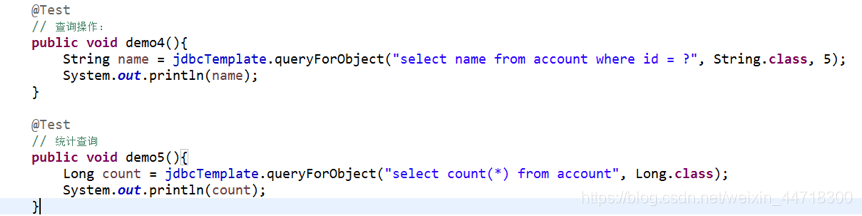

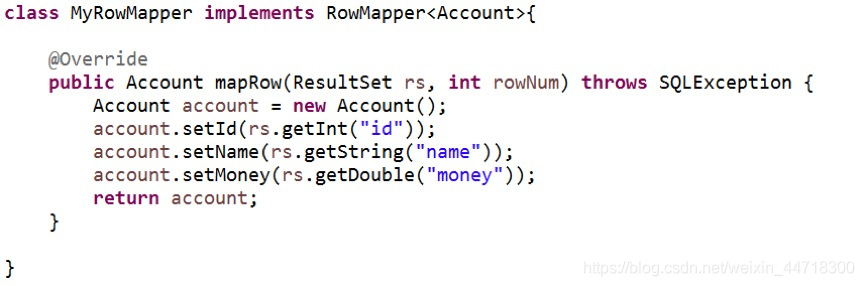
封装数据:
Spring的JDBC的使用(配置和CRUD)的更多相关文章
- Mysql在spring中jdbc.properties连接配置
############################## mysql的数据源 ############################## jdbc.driver=com.mysql.jdbc.D ...
- Spring实战6:利用Spring和JDBC访问数据库
主要内容 定义Spring的数据访问支持 配置数据库资源 使用Spring提供的JDBC模板 写在前面:经过上一篇文章的学习,我们掌握了如何写web应用的控制器层,不过由于只定义了SpitterRep ...
- spring中jdbc的配置
本文中的JdbcTemplate的用法可以参看官方文档http://docs.spring.io/spring/docs/3.2.5.RELEASE/spring-framework-referenc ...
- 【Spring JDBC】数据源配置(二)
一.Spring内置数据源 1. 创建Maven Project,修改pom.xml <properties> <!-- JDK版本 --> <java.version& ...
- 十九 Spring的JDBC模版使用: 模版的CRUD的操作
Spring的JDBC模版使用: 模版的CRUD的操作 保存操作 修改操作 删除操作 查询操作 import com.ithheima.jdbc.domian.Account; @RunWith(Sp ...
- Spring整合JDBC(连接池、JDBC模板、Dao配置到Spring容器、配置文件的优化)
1.Spring整合JDBC (1)导包(共12个): c3p0连接池.JDBC驱动(4个) Spring-jdbc.Spring-tx事务(2个) (2)JDBC模板对象(JDBCTemplate) ...
- Spring的JDBC模板
Spring对持久层技术支持 JDBC : org.springframework.jdbc.core.JdbcTemplate Hibernate3.0 : org.springframework. ...
- java框架之Spring(3)-JDBC模板使用&事务管理
下面内容使用到的 jar 包下载 JDBC模板使用 入门 1.导包,如要导入 Spring 的基本开发包.数据库驱动包.Spring 提供的 JDBC 模板包,如下: 2.测试: @Test publ ...
- Spring+SpringMVC+JDBC实现登录
Spring+SpringMVC+JDBC实现登录 有一位程序员去相亲的时候,非常礼貌得说自己是一名程序员,并解释自己是做底层架构的,于是女方听到"底层"两个字,就一脸嫌弃:什么时 ...
随机推荐
- element-ui的el-table的表头与列不对齐
最好加到全局样式中: body .el-table th.gutter{ display: table-cell!important; }
- elk安装2.0版本,自己总结,比较细致 es单机的安装
用root用户会报错,版本6之前还是可以用root用户启动的,针对es的保护,数据的一些问题,6之后就不允许了. 启动成功 下面验证一下 可以直接用浏览器访问,接受http访问 配置,因为没有暴露端 ...
- ubuntu13.10安装增强功能
步骤: 1>cd /mnt 2> ./VBoxLinuxAdditions.run 3>设置共享文件夹share 4>访问共享文件夹cd /media/sf_share not ...
- ubuntu修改pip的官方源为豆瓣源
修改官方源为豆瓣源: 编辑配置文件, 如果没有, 新建一份(我这里没有): mkdir ~/.pipvim ~/.pip/pip.conf 添加内容如下: [global] index-url = h ...
- Markdown中实现折叠代码块
<details> <summary>展开查看</summary> <pre><code> System.out.println(" ...
- SpringMvc 返回json的三种方式
参考:https://blog.csdn.net/fupengyao/article/details/62220886
- redis 高级学习和应用场景
redis 高级学习 1.redis 复制 2.redis 集群 3.哨兵机制 4.spring 与哨兵结合 5.数据恢复与转移 6.redis 的阻塞分析 redis 实战 1. 数据缓存(热点数据 ...
- uniapp - 导航切换(样式)
<view class="text-area" v-for="(menu,i) in menus" :key="i" v-show=& ...
- CF1285D Dr. Evil Underscores
挂个链接 Description: 给你 \(n\) 个数 \(a_1,a_2,--,a_n\) ,让你找出一个 \(x\) ,使 \(x\) 分别异或每一个数后得到的 \(n\) 个结果的最大值最小 ...
- Python 之网络编程之socket(3)hashlib模块
hashlib模块 #hashlib 这个模块是一堆加密算法的集合体,哈希算法的加密方式不止一种 httpswww.cmd5.com md5解密 # 应用场景在需要效验功能时使用 用户密码的 ...