
一文教你快速修改ubuntu终端显示的主机名和用户名
为了让终端的显示更加简洁,清爽,改掉显示的用户名和主机名,改成你喜欢的名字。
创作不易,如果本文帮到了您;
如果本文帮到了您,请帮忙点个赞 ;
如果本文帮到了您,请帮忙点个赞 ;
如果本文帮到了您,请帮忙点个赞 ;
1 前言
为了让终端的显示更加简洁,清爽,在此记录一下。心急的读者可以直接跳到第四节。
快捷键 alt+ctrl+t 打开终端,首先它是这样的,如下图所示;
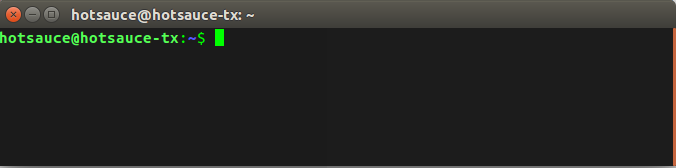
大概格式是这样子的:
用户名@主机名
hotsauce@hotsauce-tx
现在如何这些花里胡哨的字符串消失呢?
2 开始动手
首先,在系统启动bash终端的时候,会为用户读取一个文件名为.bashrc的文件,这个文件保存了用户一些个性化的设置,包括终端颜色,显示的用户名之类的东西;
现在打开.bashrc文件,具体如下:
# ~/.bashrc: executed by bash(1) for non-login shells.

# see /usr/share/doc/bash/examples/startup-files (in the package bash-doc)

# for examples

# If not running interactively, don't do anything

case $- in

    *i*) ;;

      *) return;;

esac

# don't put duplicate lines or lines starting with space in the history.

# See bash(1) for more options

HISTCONTROL=ignoreboth

# append to the history file, don't overwrite it

shopt -s histappend

# for setting history length see HISTSIZE and HISTFILESIZE in bash(1)

HISTSIZE=1000

HISTFILESIZE=2000

# check the window size after each command and, if necessary,

# update the values of LINES and COLUMNS.

shopt -s checkwinsize

# If set, the pattern "**" used in a pathname expansion context will

# match all files and zero or more directories and subdirectories.

#shopt -s globstar

# make less more friendly for non-text input files, see lesspipe(1)

[ -x /usr/bin/lesspipe ] && eval "$(SHELL=/bin/sh lesspipe)"

# set variable identifying the chroot you work in (used in the prompt below)

if [ -z "${debian_chroot:-}" ] && [ -r /etc/debian_chroot ]; then

    debian_chroot=$(cat /etc/debian_chroot)

fi

# set a fancy prompt (non-c阿里通olor, unless we know we "want" color)

case "$TERM" in

    xterm-color|*-256color) color_prompt=yes;;

esac

# uncomment for a colored prompt, if the terminal has the capability; turned

# off by default to not distract the user: the focus in a terminal window

# should be on the output of commands, not on the prompt

#force_color_prompt=yes

if [ -n "$force_color_prompt" ]; then

    if [ -x /usr/bin/tput ] && tput setaf 1 >&/dev/null; then

    # We have color support; assume it's compliant with Ecma-48

    # (ISO/IEC-6429). (Lack of such support is extremely rare, and such

    # a case would tend to support setf rather than setaf.)

    color_prompt=yes

    else

    color_prompt=

    fi

fi

if [ "$color_prompt" = yes ]; then

    PS1='${debian_chroot:+($debian_chroot)}\[\033[01;32m\]\u@\h\[\033[00m\]:\[\033[01;34m\]\w\[\033[00m\]\$ '

else

    PS1='${debian_chroot:+($debian_chroot)}\u@\h:\w\$ '

fi

unset color_prompt force_color_prompt

# If this is an xterm set the title to user@host:dir

case "$TERM" in

xterm*|rxvt*)

    PS1="\[\e]0;${debian_chroot:+($debian_chroot)}\u@\h: \w\a\]$PS1"

    ;;

*)

    ;;

esac

# enable color support of ls and also add handy aliases

if [ -x /usr/bin/dircolors ]; then

    test -r ~/.dircolors && eval "$(dircolors -b ~/.dircolors)" || eval "$(dircolors -b)"

    alias ls='ls --color=auto'

    #alias dir='dir --color=auto'

    #alias vdir='vdir --color=auto'

    alias grep='grep --color=auto'

    alias fgrep='fgrep --color=auto'

    alias egrep='egrep --color=auto'

fi

# colored GCC warnings and errors

#export GCC_COLORS='error=01;31:warning=01;35:note=01;36:caret=01;32:locus=01:quote=01'

# some more ls aliases

alias ll='ls -alF'

alias la='ls -A'

alias l='ls -CF'

# Add an "alert" alias for long running commands.  Use like so:

#   sleep 10; alert

alias alert='notify-send --urgency=low -i "$([ $? = 0 ] && echo terminal || echo error)" "$(history|tail -n1|sed -e '\''s/^\s*[0-9]\+\s*//;s/[;&|]\s*alert$//'\'')"'

# Alias definitions.

# You may want to put all your additions into a separate file like

# ~/.bash_aliases, instead of adding them here directly.

# See /usr/share/doc/bash-doc/examples in the bash-doc package.

if [ -f ~/.bash_aliases ]; then

    . ~/.bash_aliases

fi

# enable programmable completion features (you don't need to enable

# this, if it's already enabled in /etc/bash.bashrc and /etc/profile

# sources /etc/bash.bashrc).

if ! shopt -oq posix; then

  if [ -f /usr/share/bash-completion/bash_completion ]; then

    . /usr/share/bash-completion/bash_completion

  elif [ -f /etc/bash_completion ]; then

    . /etc/bash_completion

  fi

fi
3 PS1变量
这里暂时不分析这个脚本了,因为我们要快速解决问题;
直接搜索PS1找到关键代码如下:
if [ "$color_prompt" = yes ]; then

    PS1='${debian_chroot:+($debian_chroot)}\[\033[01;32m\]\u@\h\[\033[00m\]:\[\033[01;34m\]\w\[\033[00m\]\$ '

else

    PS1='${debian_chroot:+($debian_chroot)}\u@\h:\w\$ '

fi

unset color_prompt force_color_prompt

# If this is an xterm set the title to user@host:dir

case "$TERM" in

xterm*|rxvt*)

    PS1="\[\e]0;${debian_chroot:+($debian_chroot)}\u@\h: \w\a\]$PS1"

    ;;

*)

    ;;

esac
解释一下,这里的
PS1是一个全局变量,用于显示用户主机名称工作目录,所以只要修改这个变量即可;
再打开一个终端,输入以下指令;
echo $PS1
具体输出如下所示;

这样我们大概知道具体是脚本里哪句代码生效了,下面是这些参数的作用,可以看一下,如下表所示;
| 参数 | 作用 |
|---|---|
| \d | 代表日期,格式为weekday month date,例如:“Mon Aug 1” |
| \H | 完整的主机名称 |
| \h | 仅取主机的第一个名字,如上例,则为fc4,.linux则被省略 |
| \t | 显示时间为24小时格式,如:HH:MM:SS |
| \T | 显示时间为12小时格式 |
| \A | 显示时间为24小时格式:HH:MM |
| \u | 当前用户的账号名称 |
| \v | BASH的版本信息 |
| \w | 完整的工作目录名称。家目录会以 ~代替 |
| \W | 利用basename取得工作目录名称,所以只会列出最后一个目录 |
| # | 下达的第几个命令 |
| $ | 提示字符,如果是root时,提示符为:# ,普通用户则为:$ |
4 解决办法
4.1 主机名和用户名消失
打开文件;
sudo vi ~/.bashrc
如果单纯只是消失的话,在.bashrc的最后一行加上
PS1='\[\e]0;#: \w\a\]${debian_chroot:+($debian_chroot)}\[\033[01;32m\]#\[\033[00m\]:\[\033[01;34m\]\w\[\033[00m\]\$'
直接删除\u和\h,另外我不喜欢@,所以这里加了一个#。
输入以下指令让修改生效;
sudo source ~/.bashrc
再次启动终端;
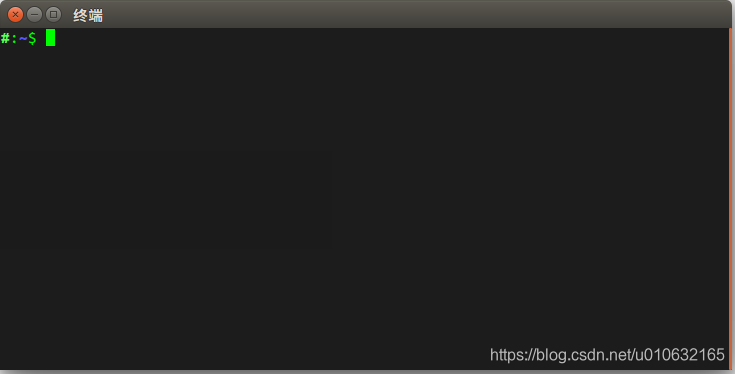
4.2 修改显示的主机名和用户名
那如果我们没有那么残忍,只是希望修改显示的主机名和用户名,又该怎么做呢?
OK!!!
sudo vi /etc/hostname
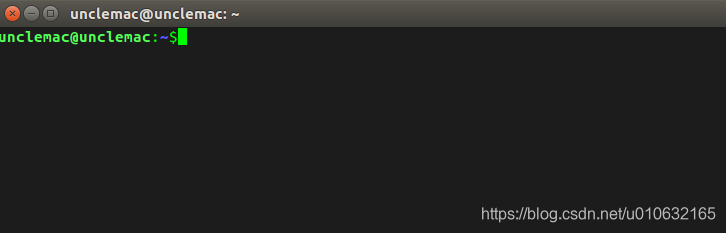
这里将hostname改成unclemac,并且需要重启一下电脑;
然后打开.bashrc,在文件最后添加下面这行代码;
PS1='\[\e]0;\h@\h: \w\a\]${debian_chroot:+($debian_chroot)}\[\033[01;32m\]\h@\h\[\033[00m\]:\[\033[01;34m\]\w\[\033[00m\]\$'
这里已经将\u全都替换为\h,所以最终会显示新的主机名@主机名的格式;
打开终端,发现,生效了;
笔者能力和水平有限,文中难免有错误和纰漏之处,请大佬们不吝赐教;
创作不易,如果本文帮到了您;
如果本文帮到了您,请帮忙点个赞 ;
如果本文帮到了您,请帮忙点个赞 ;
如果本文帮到了您,请帮忙点个赞 ;
一文教你快速修改ubuntu终端显示的主机名和用户名的更多相关文章
- Ubuntu修改终端显示的主机名、用户名、目录不同颜色
打开终端输入:echo $PS1 输入:gedit ~/.bashrc #定位到如下代码: if [ "$color_prompt" = yes ]; then PS1='${de ...
- 修改ubuntu终端显示目录和计算机名称(转)
注意:使用方法:# PS1='自定义内容' 注意两边的单引号 示例: PS1='(\u@\H \d \t)\$' ------------------------------------------- ...
- Mac终端中主机名与用户名的修改
Mac终端的主机名称+用户名全部显示出来的话会可能显得特别长,影响整体美观,可以切换至root用户后 修改.bashrc文件进行格式化. 1. 终端中切换root用户 su - root 2. 修改/ ...
- ubuntu下如何设置主机名
方法如下: 在终端输入 hostname 查看主机名主机名存放在/etc/hostname中 ,sudo gedit /etc/hostname 修改后保存/etc/hosts 还有一份 , sudo ...
- 阿里云修改CentOS Linux服务器的主机名
阿里云主机的默认主机名是为AY开头的随机名称,如何修改为易于区分的友好名称呢?请看下面的操作步骤: 1. vi /etc/hosts i键,修改主机名,esc键,:wq键保存退出 2. vi /etc ...
- 改变ubuntu终端显示语言(桌面系统是中文,终端提示是英文)
打开终端: $ vi .bashrc 最后添加 if [ "$TERM"="linux" ] ;then export LANGUAGE=en_US expor ...
- 设置ubuntu 终端显示路径长度
~/.bashrc 这个文件记录了用户终端配置. 打开~/.bashrc 这个文件 $: sudo vim ~/.bashrc 找到 将蓝色的w由小写改成大写,可以表示只显示当前目录名称.
- 修改oracle服务器所在linux主机名
1.修改/etc/hosts 2.修改 /etc/sysconfig/network 3.修改oracle的 listener.ora 4.修改 tnsnames.ora
- ubuntu如何修改terminal终端的主机名(修改/etc/hostname文件)
有时候安装完Ubuntu系统后,打开命令终端,终端显示的主机名格式比较难看,例如 我最近买的国内某云的VPS. xxx@VM-1560-ubuntu$ xxx@VM-1560-ubuntu$ 对于有洁 ...
随机推荐
- D - Romantic
The Sky is Sprite. The Birds is Fly in the Sky. The Wind is Wonderful. Blew Throw the Trees Trees ar ...
- Buu刷题
前言 希望自己能够更加的努力,希望通过多刷大赛题来提高自己的知识面.(ง •_•)ง easy_tornado 进入题目 看到render就感觉可能是模板注入的东西 hints.txt给出提示,可以看 ...
- 常见web漏洞的整理之SQL注入
SQL注入: 简介: 全称Structured Query Language,即结构化查询语言,是一种特殊的编程语言,用于数据库中的标准数据查询语言.也被作为关系式数据库管理系统的标准语言. 原理: ...
- (一)微信小程序:实现引导页
基本目录结构 index目录下文件操作步骤 1.针对index.wxml <!--index.wxml--> <view class="index-container&qu ...
- Spring Cloud Gateway+Nacos,yml+properties两种配置文件方式搭建网关服务
写在前面 网关的作用不在此赘述,举个最常用的例子,我们搭建了微服务,前端调用各服务接口时,由于各服务接口不一样,如果让前端同事分别调用,前端同事会疯的.而网关就可以解决这个问题,网关屏蔽了各业务服务的 ...
- python 进阶篇 python 的值传递
值传递和引用传递 值传递,通常就是拷贝参数的值,然后传递给函数里的新变量,这样,原变量和新变量之间互相独立,互不影响. 引用传递,通常是指把参数的引用传给新的变量,这样,原变量和新变量就会指向同一块内 ...
- 手机app测试用例怎么写?手机app测试点有哪些?只有干货没有水分,错过绝对后悔!
一.前言 在当今竞争激烈的市场上一个APP的成功离不开一个可靠的测试工程师.因此,对功能和用户体验有特殊关注的App进行全面测试是必不可少的.如何做到测试用例的百分百覆盖一直是测试用例编写过程中 ...
- VideoView--简单获取进度条的方法
使用MediaController类就可以简单的把视频中的进度条加进去 实例: 现在布局哪里放一个VideoView,然后: videoView = (VideoView) findViewById( ...
- linux下批量删除文件
1. 在linux批量删除多级目录下同一格式的文件,可采用find + exec命令组合: 如在删除old目录下的,所有子目录中,后缀为.l的文件方法为: find old -type f -name ...
- 2019-2020-1 20199329《Linux内核原理与分析》第五周作业
<Linux内核原理与分析>第五周作业 一.上周问题总结: 虚拟机将c文件汇编成汇编文件时忘记添加include<stdio.h> gdb跟踪汇编过程不熟练 二.本周学习内容: ...