
silverlight导出excel
开发导出excel,首先需要添加项目引用。
Microsoft.CSharp
这个是应用dynamic的前提。
在代码页,需要添加引用
using System.Runtime.InteropServices.Automation;
以下是我具体制作业务导出的其中一个功能的代码,供大家参考。
private ICommand _excelCommand;

        public ICommand ExcelCommand

        {

            get

            {

                if (_excelCommand == null)

                {

                    _excelCommand = new RelayCommand<Grid>((g) =>

                    {

                        dynamic excel = AutomationFactory.CreateObject("Excel.Application");

                        excel.Visible = true;

                        dynamic workbook = excel.workbooks;

                        workbook.Add();

                        dynamic sheet = excel.ActiveSheet;

                        dynamic cell = null;

                        int i = ;

                        // 将数据传输到Excel

                        foreach (BusinessBillOutModel item in SelectItems)

                        {

                            //ItemCollection.Add(item);

                            //销售日期

                            cell = sheet.Cells[i, ]; // 列和行

                            cell.Value = item.BillDate;

                            cell.ColumnWidth = ;

                            //名称

                            cell = sheet.Cells[i, ];

                            cell.Value = SettingSpace.CodeNameConvert(GlobalEnum.BaseType.BasePart, item.PartCode);

                            //金额

                            cell = sheet.Cells[i, ];

                            cell.Value = item.TotalPrice;

                            //班组

                            cell = sheet.Cells[i, ];

                            cell.Value = SettingSpace.CodeNameConvert(GlobalEnum.BaseType.TeamWork,item.TeamWork);

                            //收款员(里台员)

                            cell = sheet.Cells[i, ];

                            cell.Value = SettingSpace.CodeNameConvert(GlobalEnum.BaseType.UserType,item.SellPerson);

                            //司机

                            cell = sheet.Cells[i, ];

                            cell.Value = SettingSpace.CodeNameConvert(GlobalEnum.BaseType.UserType,item.AgentPerson);

                            //备注

                            cell = sheet.Cells[i, ];

                            cell.Value = item.BillRemark;

                            i++;

                        }

                    });

                }

                return _excelCommand;

            }

        }
//开发过程中遇到的问题。
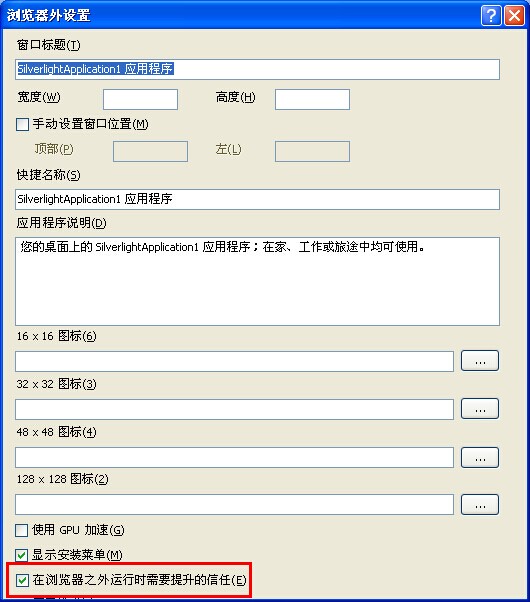
在开发silverlight导出excel时遇到【此操作在当前上下文中不受支持】,最后调试成功,具体原因,是在项目的属性设置中没有勾选一个选项,具体参看截图。
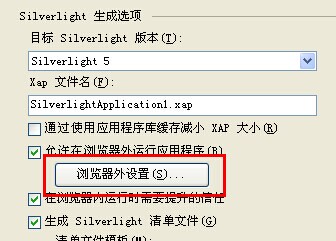
点击 浏览器外设置,在弹出界面勾选 在浏览器之外运行时需要提升的信任。即可解决
silverlight导出excel的更多相关文章
- js 导出Excel
最近从Silverlight这边转到javascript过来,现在要导出一个导出excel的功能.上级领导指示当页显示多少数据,就导出多少数据,没有必要从后台在去数据.以前也没有接触过这方面的,在网上 ...
- 导入,导出excel
/// <summary> /// 导出数据 /// </summary> /// <param name="XMMC"></param& ...
- C#使用Aspose.Cells导出Excel简单实现
首先,需要添加引用Aspose.Cells.dll,官网下载地址:http://downloads.aspose.com/cells/net 将DataTable导出Xlsx格式的文件下载(网页输出) ...
- 利用poi导出Excel
import java.lang.reflect.Field;import java.lang.reflect.InvocationTargetException;import java.lang.r ...
- [django]数据导出excel升级强化版(很强大!)
不多说了,原理采用xlwt导出excel文件,所谓的强化版指的是实现在网页上选择一定条件导出对应的数据 之前我的博文出过这类文章,但只是实现导出数据,这次左思右想,再加上网上的搜索,终于找出方法实现条 ...
- NPOI导出Excel
using System;using System.Collections.Generic;using System.Linq;using System.Text;#region NPOIusing ...
- ASP.NET Core 导入导出Excel xlsx 文件
ASP.NET Core 使用EPPlus.Core导入导出Excel xlsx 文件,EPPlus.Core支持Excel 2007/2010 xlsx文件导入导出,可以运行在Windows, Li ...
- asp.net DataTable导出Excel 自定义列名
1.添加引用NPOI.dll 2.cs文件头部添加 using NPOI.HSSF.UserModel; using NPOI.SS.UserModel; using System.IO; 3.代码如 ...
- Aspose.Cells导出Excel(1)
利用Aspose.Cells导出excel 注意的问题 1.DataTable的处理 2.进行编码,便于中文名文件下载 3.别忘了Aspose.Cells.dll(可以自己在网上搜索) public ...
随机推荐
- 浅谈C#Socket
好不容易把socket通信搞懂一点,比较喜欢做笔记,嘿嘿~ 希望共同学习,共同进步! socket通信是C#中非常基础的一个知识点,我这里用到的是基于Tcp协议的socket通信.Tcp会有三次握手连 ...
- spring-boot 之 使用Admin监控应用
https://yq.aliyun.com/articles/2322 ************************************* 摘要: Spring Boot提供的监控接口,例如: ...
- 121. Best Time to Buy and Sell Stock
Say you have an array for which the ith element is the price of a given stock on day i. If you were ...
- j.APR连接器整体框图(含SSL实现分析)
APR连接器的思路和bio,nio的整体架构也是类似的,可以看到下面的整体框图: 第一个区别是,对于从Acceptor线程中的socket解析这块,无论是nio还是bio都是在Acceptor线程内直 ...
- upupw一键绿色免安装环境包
项目测试,选择upupw环境包 下载nginx版本,解压即可使用 任务就是要把我电脑上的项目test.com提供给公司局域网同事访问,如果是apache的话,前面的wampserver已经讲过了. 1 ...
- liunx 系统 git clone ssh代码时需要sshkey
1. 在root用户目录下 执行命令 cd .ssh cat id_rsa.pub 粘贴 ssh key
- angular遇到问题
一.一个js中只有一个angunlar.module,但可以有多个controller,从而控制多个不同的作用域,每个作用域都有独立的$scope.不同作用域之间又有$rootScope这个桥梁 二. ...
- 根据不同的ie的版本号,制定不同的方法
<!DOCTYPE html> <html> <head lang="en"> <meta charset="UTF-8&quo ...
- windows7 64,32位下scrapy爬虫框架的环境搭建
适用于python 2.7 64位安装 一.操作系统:WIN7 64位 二.python版本:2.7 64位(scrapy目前不支持3.x) 不确定位数的,看图 三.安装相关软件:(可以从我的百度网盘 ...
- SQL数据库索引查询
SELECT IA_ID,IA_Title,IT_ParentID,IA_Content,IA_CreateDate,IA_Author, )))) AS States FROM dbo.InfoAr ...