
Upgrading WebLogic Application Environments --官方文档
http://docs.oracle.com/cd/E13179_01/common/docs92/upgrade/dirstruct.html
WebLogic Domain Directory Structure Enhancements
As of 9.0, WebLogic Server offers the following enhancements to the structure of the WebLogic domain directory:
- To improve configuration management and promote XML file validation, WebLogic Server supports the specification of domain configuration data in multiple files, including
config.xml, in the newdomain_name/configdirectory. (Heredomain_namespecifies the domain directory.) In previous releases, theconfig.xmlfile was the repository for all configuration information. Now, new subdirectories ofconfigmaintain configuration modules for diagnostic, JDBC, JMS, Node Manager, and security subsystems. Each configuration file adheres to an XML Schema definition. - Startup and shutdown scripts are maintained in the
domain_name/bindirectory. In previous releases, they were stored in the root directory of the domain.
In addition to the structural enhancements to the domain directory, WebLogic Server supports new utilities for managing changes to server configuration. These new tools enable you to implement a secure, predictable means for distributing configuration changes in a domain. For more information, see "Managing Configuration Changes" in Understanding Domain Configuration at http://download.oracle.com/docs/cd/E13222_01/wls/docs92/domain_config/changes.html.
For more details about the WebLogic Server 9.x domain directory structure, see "Domain Configuration Files" in Understanding Domain Configuration at http://download.oracle.com/docs/cd/E13222_01/wls/docs92/domain_config/config_files.html.
Figure C-1 compares the domain directory structures for WebLogic Server 9.x and WebLogic Server 8.1.
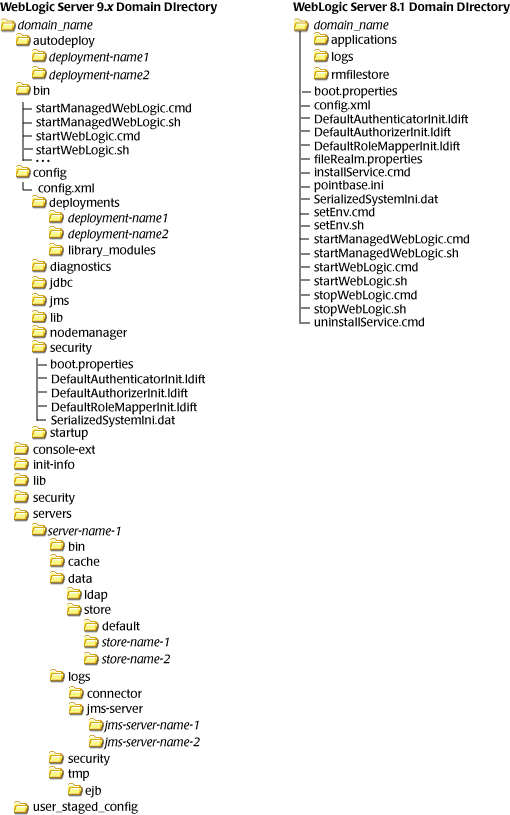
The following sections describe the domain directory structures for WebLogic Server 8.1, 7.0, and 6.1.
WebLogic Server 8.1 Domain Directory Structure
In WebLogic Server 8.1 environments, the domain directory structure created by the Configuration Wizard contains:
- A domain root directory with the same name as the domain, such as
mydomainorpetstore. This directory contains the following:
config.xmlfile for the domain- Scripts used to start server instances and establish the environment
- Subdirectory for storing applications for the domain, typically named
applications.
When you start a server instance in a domain for the first time, WebLogic Server creates the following subdirectories in the domain directory:
- Files containing security information
logsdirectory for storing domain-level logs- For each server running in the domain, a directory for storing server logs and HTTP access logs
For more details about the WebLogic Server 8.1 domain directory structure, see "Overview of WebLogic Server Domains" in Configuring and Managing WebLogic Server at http://download.oracle.com/docs/cd/E13222_01/wls/docs81/adminguide/overview_domain.html. For a summary of the directory structure contents for the default configuration templates, see "Template Reference" in Creating and Configuring WebLogic Domains Using the Configuration Wizard at http://download.oracle.com/docs/cd/E13196_01/platform/docs81/confgwiz/tempref.html.
WebLogic Server 7.0 Domain Directory Structure
In WebLogic Server 7.0 environments, the root of the domain directory structure is a directory with the same name as the domain, such as mydomain or petstore. This directory should contain the following:
config.xmlfile for the domain- Scripts you use to start server instances and establish your environment
- For storing applications for the domain, a directory, typically named
applications.
When you start a server instance in a domain for the first time, WebLogic Server creates the following subdirectories in the domain directory:
datadirectory for storing security informationlogsdirectory for storing domain-level logs- For each server running in the domain, a
server_namedirectory for storing server-level logs tempdirectory for storing temporary files
The following sample tree shows where the directories are created in a domain directory called mydomain.
For more information about the WebLogic Server 7.0 domain directory structure, see "Domain Directories Structure" in "Domain Restrictions" in "Overview of WebLogic Server Domains" in Creating and Configuring WebLogic Server Domains at http://download.oracle.com/docs/cd/E13222_01/wls/docs70/admin_domain/overview.html.
WebLogic Server 6.1 Domain Directory Structure
In WebLogic Server 6.1 environments, the configuration information for all of the WebLogic administrative domains resides in the configuration repository, which is located, in turn, in the WL_HOME/config directory. Specifically, config contains a configuration subdirectory for each domain. The name of each domain-specific subdirectory must match the name of the domain.
The domain directory structure contains a root directory with the same name as the domain, such as mydomain or petstore. This directory should contain the following:
config.xmlfile for the domain- Scripts you use to start server instances and establish your environment
- For storing applications for the domain, a subdirectory, typically named
applications logsdirectory for storing domain-level logs
For more information about the WebLogic Server 6.1 domain directory structure, see "Creating a New Domain" in "Overview of WebLogic Server Management" in WebLogic Server Administration Guide at http://download.oracle.com/docs/cd/E13222_01/wls/docs61/adminguide/overview.html.
Upgrading WebLogic Application Environments --官方文档的更多相关文章
- hbase官方文档(转)
FROM:http://www.just4e.com/hbase.html Apache HBase™ 参考指南 HBase 官方文档中文版 Copyright © 2012 Apache Soft ...
- HBase官方文档
HBase官方文档 目录 序 1. 入门 1.1. 介绍 1.2. 快速开始 2. Apache HBase (TM)配置 2.1. 基础条件 2.2. HBase 运行模式: 独立和分布式 2.3. ...
- Spring 4 官方文档学习(十一)Web MVC 框架之配置Spring MVC
内容列表: 启用MVC Java config 或 MVC XML namespace 修改已提供的配置 类型转换和格式化 校验 拦截器 内容协商 View Controllers View Reso ...
- Spring Cloud官方文档中文版-客户端负载均衡:Ribbon
官方文档地址为:http://cloud.spring.io/spring-cloud-static/Dalston.SR2/#_spring_cloud_netflix 文中例子我做了一些测试在:h ...
- Spring 4 官方文档学习(十四)WebSocket支持
个人提示:如果需要用到页面推送,高频且要低延迟,WebSocket无疑是最佳选择.否则还是轮询和long polling吧. 做了一个小demo放在码云上,有兴趣的可以看一下,简单易懂:websock ...
- Spark SQL 官方文档-中文翻译
Spark SQL 官方文档-中文翻译 Spark版本:Spark 1.5.2 转载请注明出处:http://www.cnblogs.com/BYRans/ 1 概述(Overview) 2 Data ...
- Spring 4 官方文档学习(十二)View技术
关键词:view technology.template.template engine.markup.内容较多,按需查用即可. 介绍 Thymeleaf Groovy Markup Template ...
- Spring 4 官方文档学习(十一)Web MVC 框架之异常处理
1.HandlerExceptionResolver Spring HandlerExceptionResolver的实现们会处理controller执行过程中发送的unexpected except ...
- Google Android官方文档进程与线程(Processes and Threads)翻译
android的多线程在开发中已经有使用过了,想再系统地学习一下,找到了android的官方文档,介绍进程与线程的介绍,试着翻译一下. 原文地址:http://developer.android.co ...
随机推荐
- 使用Jenkins容器构建时,关于maven项目settings.xml的位置
切记切记:必须要放在 /root/.m2/settings.xml,要不然Jenkins容器中执行mvn命令时settings会不生效
- mysql 按照时间查询
这篇文章转载自http://blog.csdn.net/wangjuan_01/article/details/51726588 今天 select * from 表名 where to_days(时 ...
- ASP.NET MVC5实现伪静态
目录 1.什么是伪静态?为什么要实现伪静态? 2.实现APS.NET MVC伪静态的方式有哪些? 3.那么如何实现使用ASP.NET MVC5的伪静态呢? (1)在路由注册中启用特性路由 (2)为需要 ...
- Python验证实现登陆功能以及用户锁定(文件存储)
废话不多说先交代码(只是一个简单的验证):#!/usr/bin/env python #-*- coding:utf8 -*- # Structured program ‘#’是注释 # Functi ...
- WPF 按名称查找控件
1FrameworkElement类FindName方法 使用过程 1.容器控件.RegisterName("Name",要注册的控件) //注册控件 2.容器控件.FindN ...
- Promise之你看得懂的Promise
本文由作者陈旭锋(任职网易考拉)授权网易云社区发布. Promise源码详解 学习知识要善于思考,思考,再思考. -- 爱因斯坦 1.回调地狱 曾几何时,我们的代码是这样的,为了拿到回调的结果,不得不 ...
- Tomcat绿色版启动"startup.bat"一闪问题的解决方法!
进入DOS窗口,运行"startup.bat",会出现错误提示,我是win7 64位,提示“JRE_HOME”设置不正确.于是进入环境变量配置,设置“JRE_HOME”项,随后保存 ...
- 深入了解java虚拟机(JVM) 第七章 内存分配策略
理解了jvm内存分配策略不仅是程序性能调优的重要知识,还能够给养成自己一种良好的代码思路,一个程序的代码差异往往都是在这里体现出来的. 一.对象优先分配到Eden区域 一般来说,新创建的对象都会直 ...
- “全栈2019”Java第一百零五章:匿名内部类覆盖作用域成员详解
难度 初级 学习时间 10分钟 适合人群 零基础 开发语言 Java 开发环境 JDK v11 IntelliJ IDEA v2018.3 文章原文链接 "全栈2019"Java第 ...
- “全栈2019”Java第四章:创建第一个Java程序
难度 初级 学习时间 10分钟 适合人群 零基础 开发语言 Java 开发环境 JDK v11 IntelliJ IDEA v2018.3 文章原文链接 "全栈2019"Java第 ...